Instantly.AI Email Deliverability Issues And How To Fix Them in 2026
Instantly AI email deliverability issues explained with root causes and fixes. Learn how email warm-up, spam testing, and sender reputation impact inbox placement.
Deliverability is the missing piece of your email strategy.
Even the most strategic campaigns fail if they get stuck in spam. Make sure your best work gets results. Run a free placement test to see where your emails are really going.
Instantly is a popular cold email platform used by sales teams, founders, and agencies to run outbound campaigns at scale. It combines inbox management and a built-in warm-up to launch outreach quickly without stitching together multiple tools.
Instantly AI email deliverability issues often don’t show up at the start. Early campaigns may perform well, but as sending volume increases, problems with email warm-up quality, spam test accuracy, and sender reputation begin to surface.
Users often like Instantly for its ease of setup, ability to manage multiple inboxes, and automation around sending and warm-up.
“I love how easy Instantly is to set up, which significantly reduces the time I spend managing my B2B email marketing for my AI automation agency.”- G2 user
At the same time, Instantly is not a dedicated deliverability platform. Its primary focus is outbound automation. Inbox health and reputation become important as teams grow and sending volume increases
In this blog, we will explain what "Instantly deliverability issues" mean, their common causes, and how to determine if your current setup is enough or if you need a more deliverability-focused approach as you scale.
Common Email Deliverability Issues With Instantly AI
As teams scale their outreach efforts, the limitations of Instantly AI in managing long-term deliverability issues become more apparent. Let’s take a look at the most common deliverability issues users face with the platform:
Domain reputation issues masked by early warm-up success
One common challenge users face with Instantly is that new or reused domains may perform well during the initial warm-up phase, but experience a reputation decline once real campaigns launch.
While Instantly's automated warm-up may show positive early results, it doesn’t always simulate the quality engagement needed for long-term inbox placement.
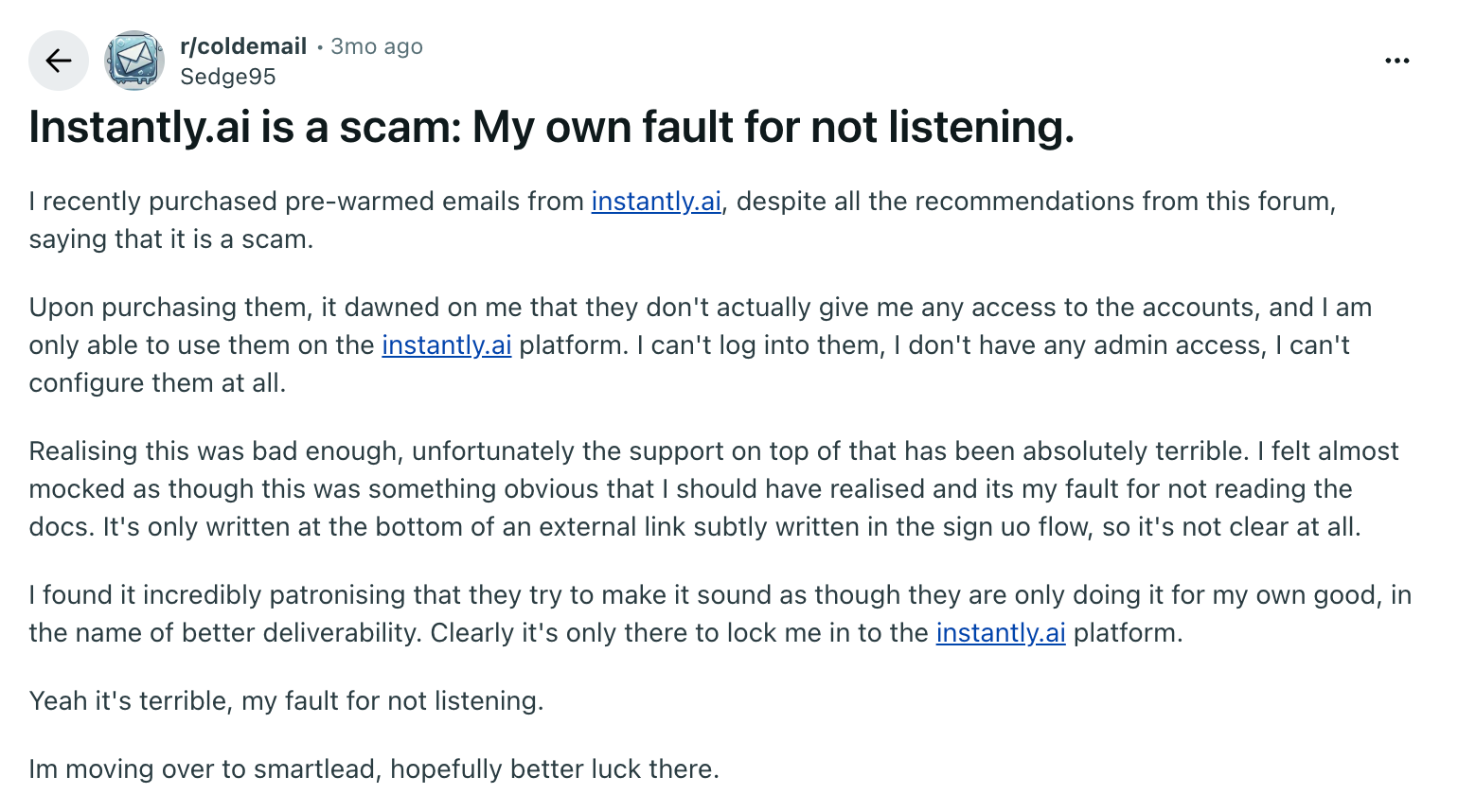
For example, one Reddit user reported purchasing pre-warmed email accounts but having no control over how those accounts had been used previously.
User criticizes Instantly.ai for limited account access and poor customer support.
Despite early success, their emails landed in spam because they relied on custom SMTP inboxes that failed to generate meaningful engagement from real user accounts, leading to poor deliverability.
Engagement signal quality and its impact on inbox placement
Instantly’s warm-up works well for the initial setup, but struggles to maintain inbox placement over time. Warm-up signals often fail to align with how inbox providers like Gmail and Outlook evaluate sender behavior, which requires ongoing engagement with high-reputation inboxes.
Network composition plays a major role here. Instantly supports a wide range of sending setups, including custom SMTP providers like SendGrid, Mailgun, and Amazon SES. As a result, its warm-up network can include a mix of inbox types, not just Google Workspace and Microsoft 365 accounts.
Inbox providers place far more weight on engagement from trusted ecosystems like Gmail and Outlook. So even when warm-up activity appears strong, interactions from SMTP-based setups may contribute little to actual inbox placement.
As a result, the system becomes overly dependent on automated processes that do not reflect authentic user engagement patterns.
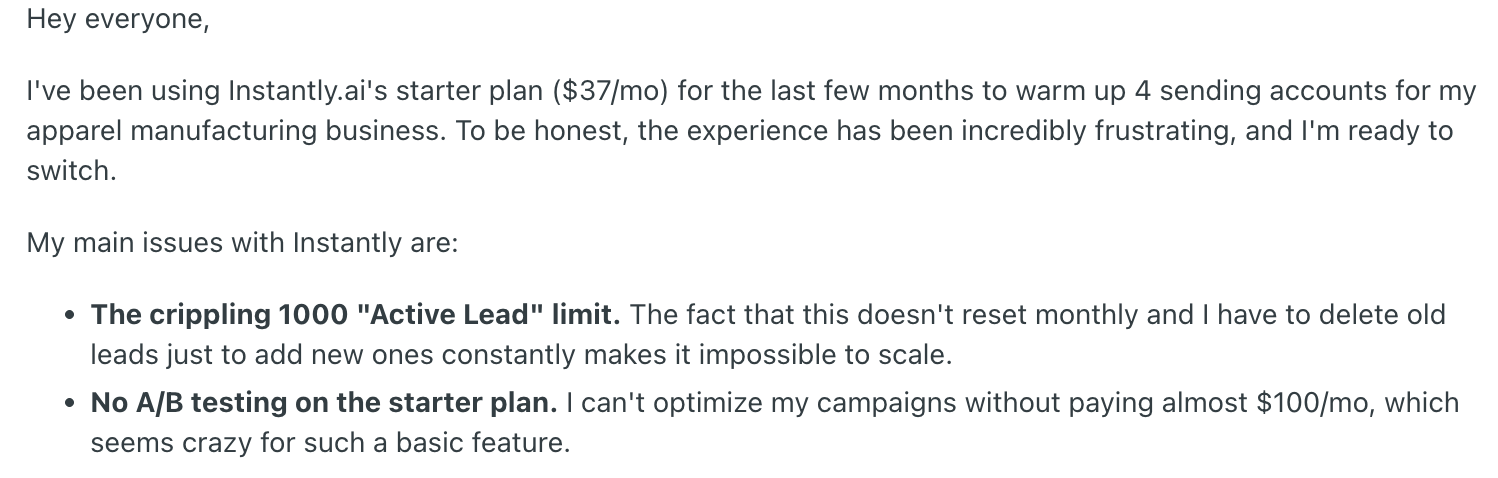
Users report that despite using Instantly’s warm-up, emails still end up in spam due to weak or artificial engagement signals. One Reddit user expressed frustrations with the 1000 "Active Lead" limit and the lack of A/B testing on the starter plan.
User shares frustration with Instantly’s limitations on the starter plan.
As outreach scaled, these limitations reduced the platform’s effectiveness, demonstrating that warm-up alone, without sustained, authentic engagement, can’t maintain long-term deliverability.
Restricted inbox placement visibility across providers
Instantly provides basic inbox placement tests, but many users report that these tests only show whether emails land in spam or the inbox. A G2 user reported that their emails still land in spam with Instantly, citing deliverability issues.
Alt text: Screenshot of user review highlighting email deliverability issues with Instantly.
Image caption: User reports emails going to spam and a reputation drop with Instantly.
The tool’s spam testing is limited and fails to detect underlying issues that affect inbox placement as outreach scales. Without real-time monitoring or in-depth spam analysis, teams struggle to resolve deliverability issues before they negatively impact campaign performance.
Plan-based feature restrictions as volume increases
A common complaint with Instantly is that many of the platform’s most powerful features are locked behind higher-tier plans. For teams just starting with the basic plan, this can feel limiting as essential tools for scaling outreach are unavailable.
A G2 user highlighted that while the interface is generally great, the Inbox Manager lacks advanced filtering and organization options needed to handle a large volume of campaigns.
User highlights pricing and Inbox Manager limitations when scaling campaigns.
Instantly AI Deliverability Features And Limitations
Before deciding whether to optimise your current setup or explore alternatives, it helps to clearly understand what Instantly is designed to handle and what falls outside its scope.
Maintaining long-term inbox stability at high volume
What Instantly does well for deliverability
Instantly offers several features designed to support better inbox placement and reduce common deliverability issues, especially for teams starting with cold outreach.
Most warm-up tools generate engagement from lower-quality inboxes, often custom SMTP accounts. These signals carry limited weight with inbox providers like Google and Microsoft. What actually impacts sender reputation is consistent positive engagement from real Gmail and Outlook inboxes.
Built-in email warm-up to establish sending behaviour
Instantly provides a fully automated Deliverability Network designed to improve sending reputation through positive email interactions across a large pool of real email accounts. Activation is handled in one click, allowing connected inboxes to begin warming automatically.
The system gradually ramps sending activity using its “Slow Ramp” approach while simulating natural engagement patterns. Advanced options such as read emulation and adjustable open and reply rates are available to better mirror human behaviour.
For teams launching new inboxes or scaling outbound, this simplifies early-stage reputation building without requiring manual coordination.
Email verification to reduce bounces and risky sends
Instantly offers built-in email verification that allows users to clean and validate email lists before launching campaigns. It checks addresses to identify invalid, risky, or non-existent emails, helping prevent unnecessary bounces.
By reducing bounce rates, verification helps protect sender reputation and supports healthier deliverability over time. Instantly also includes catch-all verification to recover additional valid leads that might otherwise be excluded.
While email verification improves data accuracy and list hygiene, it does not assess recipient intent, engagement likelihood, or reply quality.
Inbox placement testing and spam checks
Instantly offers unlimited and automated inbox placement tests across major providers like Gmail and Outlook. These tests show whether emails land in the primary inbox or spam and notify users if sending accounts begin hitting spam.
Most spam checkers (including SpamAssassin-based tools) only analyze your email content or send to a single inbox. This is not a reliable measure of deliverability. The only accurate way is to send your email to multiple real inboxes across providers and measure actual placement.
While these tests provide useful visibility into placement outcomes, they primarily surface issues after they occur. For growing teams running multiple campaigns, that delay can lead to missed replies and pipeline impact before corrective action is taken.
Blacklist monitoring
Most public blacklists have little to no impact on inbox placement.
Gmail and Microsoft rely primarily on their own internal algorithms, which are based on engagement and sending behavior, not third-party blocklists.
While blacklist monitoring can surface edge cases, it is not a reliable indicator of deliverability performance and should not be used as a primary diagnostic signal.
Why Instantly struggles to solve deliverability challenges for scaling teams
As outreach volume increases, deliverability complexity increases with it. Instantly’s feature set supports early-stage setup and maintenance, but growing teams often face structural challenges that go beyond warm-up and basic monitoring.
Coordinating warm-up and ramp-up across large teams
When multiple domains, inboxes, and SDRs are operating simultaneously, sending behaviour must be coordinated carefully. Overlapping ramp schedules, inconsistent volume increases, or identical behaviour patterns across inboxes can trigger provider scrutiny.
Instantly automates warm-up at the mailbox level, but large teams often need cross-account visibility and coordination controls to avoid internal conflicts.
Preventing cross-account reputation contamination
In scaled outbound environments, reputation signals can bleed across domains and accounts if infrastructure is not carefully segmented.
Managing isolation between accounts becomes more complex as teams expand, particularly when dozens of inboxes are active at once.
Handling provider-specific limits at scale
Google and Microsoft continuously update their sending thresholds, complaint sensitivity, and engagement evaluation models.
At higher volumes, subtle differences between Gmail and Outlook performance become more visible. Managing these differences requires ongoing monitoring and adjustments that go beyond initial authentication and warm-up.
Managing engagement quality across large outreach volumes
Inbox providers increasingly prioritise engagement signals such as replies, positive interactions, and complaint behaviour.
At scale, weak engagement signals, such as low reply rates, spam complaints, or high delete-without-read, accumulate faster. Even if bounce rates remain low and authentication passes, poor reply rates or high delete-without-read behaviour can weaken reputation over time.
Instantly provides guardrails and visibility, but it is not built as a dedicated reputation management or deliverability monitoring platform.
As a result, teams scaling outbound often require advanced diagnostics, granular visibility, and infrastructure-level controls to maintain consistent inbox placement.
How To Tackle Instantly AI Email Deliverability Issues
While Instantly provides a solid foundation for cold email campaigns, some teams may encounter challenges as they scale. As teams scale, it becomes clear that some tools provide only essential warm-up features. They often lack the depth required to maintain inbox placement and manage sender reputation effectively over the long term.
Here are some ways to stabilise inbox placement as volume grows.
Step 1: Separate sending from reputation management
Most outbound tools combine campaign logic and deliverability controls in one system. That works early on. At scale, it limits visibility.
Instead:
Monitor Gmail and Outlook performance separately
Track domain and inbox health over time
Run independent inbox placement tests under real sending conditions
Set up a custom tracking domain to avoid shared tracking reputation
Inbox providers evaluate behaviour continuously. Without independent monitoring, reputation drops often go unnoticed until reply rates fall.
Step 2: Prioritise real engagement quality over warm-up volume
Warm-up is not a one-time setup task. It must continue before, during, and between campaigns.
Focus on:
Linear, human-like daily sending patterns
Staying under safe daily volume thresholds per inbox
Avoiding sudden spikes or long idle gaps
Maintaining consistent positive interactions over time
Inbox providers evaluate engagement signals such as replies, positive interactions, spam complaints, and delete-without-read behavior.
Open rates are becoming increasingly unreliable due to privacy protections and should not be used as a primary deliverability metric.
This means that even if campaigns appear to perform well on the surface, weak reply rates or negative engagement signals can gradually degrade sender reputation.
Step 3: Strengthen your technical base before scaling further
Scaling safely starts with infrastructure discipline. Use reputable domains (avoid exotic TLDs, numbers, or hyphen-heavy variations), set up SPF, DKIM, and DMARC correctly, and configure a custom tracking domain to avoid shared tracking reputational risk.
Sending from Google Workspace or Microsoft 365 typically performs better than lesser-known SMTP providers because mailbox providers inherently trust their own ecosystems more.
Many outbound tools bundle warm-up and inbox testing inside their sending platforms. Apollo, for example, offers basic email warm-up features, but the engagement signals are relatively surface-level. It may support smaller campaigns, yet lacks deeper reputation tracking and provider-level visibility needed as volume grows.
Smartlead is another tool that can assist with initial spam avoidance and warming activity. However, its warm-up depth and long-term deliverability monitoring are limited for teams scaling across multiple inboxes.
Instantly includes built-in warm-up, verification, and inbox placement testing, which simplifies setup for smaller teams. However, as outreach scales across multiple domains and inboxes, teams often need deeper visibility into provider-level reputation shifts.
MailReach, on the other hand, is specifically designed to address these challenges by focusing on provider-trusted engagement and reputation management across major inbox providers.
provider-trusted engagement and reputation management across major inbox providers
MailReach helps improve email deliverability and campaign ROI.
It helps teams maintain high deliverability by providing advanced features like meaningful engagement during warm-up, real-time reputation tracking, and proactive insights to ensure consistent inbox placement as campaigns grow.
A better approach to email deliverability with MailReach
Instantly AI is built primarily to help teams run outbound campaigns efficiently. Deliverability features such as warm-up, inbox testing, and verification are integrated into that broader outreach workflow.
MailReach takes a different approach. Rather than embedding deliverability inside a sales execution tool, MailReach treats inbox placement as the core objective.
Its architecture is designed around reputation health, engagement quality, and provider-level visibility first. As outbound programs expand across multiple inboxes and domains, reputation signals increase.
Small inconsistencies, weak engagement patterns, or infrastructure blind spots can quietly degrade inbox placement. A platform designed specifically around reputation monitoring and warm-up quality is better equipped to manage those compounding risks.
In short, Instantly helps you send. MailReach is built to make sure those emails consistently land. The table below breaks down the key differences between MailReach and Instantly.
Criteria
MailReach
Instantly
Core focus
Dedicated deliverability and inbox placement control
Cold outreach automation with built-in warm-up
Warm-up approach
Warm-up designed to generate consistent, high-quality engagement across real professional inboxes
Network-based warm-up integrated into sending platform
Warm-up network composition
Network includes a high share of Google Workspace and Office 365 inboxes
Supports a broad mix of inbox and SMTP-based setups
Inbox placement visibility
Real-time monitoring + spam test credits included
Basic inbox vs spam placement testing
Domain & authentication checks
Includes SPF, DKIM, DMARC and blacklist monitoring inside the dashboard
Not positioned as a core diagnostic layer
Reputation tracking
Dedicated reputation tracking dashboard for domain and inbox health
Limited long-term reputation visibility
Works with
Any outreach tool via SMTP
Primarily used within Instantly’s own sending system
Best suited for
Teams prioritising inbox stability and long-term reputation management
Teams prioritising campaign automation and workflow speed
While most tools include deliverability as one of many features, MailReach is built around it as the main focus. Here’s how that helps as you scale:
Focus on deliverability, not just outreach automation
MailReach prioritises deliverability management and works alongside any outreach tool to ensure that emails consistently land in the inbox. By focusing on reputation protection and inbox placement, MailReach avoids combining outreach workflows with deliverability management, which can often cause issues at scale.
Higher-quality warm-up signals that matter to inbox providers
MailReach offers a network of 30,000+ real inboxes across major mailbox providers like Gmail, Outlook, and more, ensuring that the email warm-up process involves positive, meaningful interactions.
Around 80% of its warm-up network consists of Google Workspace and Office 365 inboxes, which are the ecosystems most B2B senders rely on and the ones inbox providers trust the most.
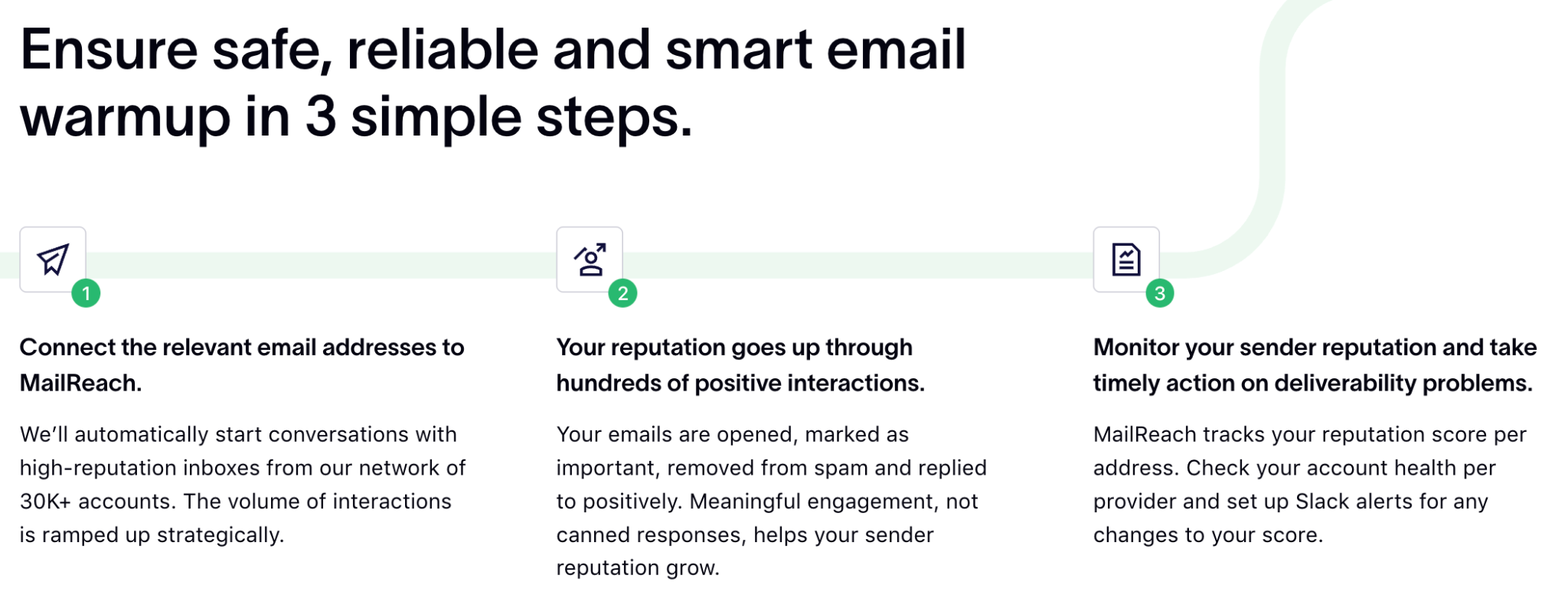
MailReach’s three-step simple process to warm up emails
As a result, MailReach focuses on generating engagement from higher-trust inboxes rather than simply increasing warm-up volume, helping build a stronger and more stable sender reputation over time.
By focusing on real, high-quality signals, MailReach reduces the reliance on generic or low-signal interactions, which are often disregarded by providers like Google and Microsoft. This process is designed to strengthen long-term sender reputation and improve consistent inbox placement & email deliverability.
Spam testing and actionable insights
Basic warm-up tools may include some spam checks, but MailReach enhances deliverability with in-depth email spam testing. MailReach’s email spam testing provides real-time insights into where your emails land, whether in the inbox, spam, or other tabs, across major providers like Gmail and Outlook.
MailReach provides accurate spam testing with multiple email addresses
It helps detect potential issues early by providing actionable report data to improve deliverability, adjust content, and monitor your sender reputation.
Deeper visibility into deliverability health
With MailReach, you get real-time reputation monitoring, allowing you to track your account health and reputation score across all major providers. This visibility ensures you can detect and address any reputation issues early, preventing them from negatively impacting your campaigns.
While Instantly's inbox placement tests are useful, they don’t provide ongoing, proactive monitoring at the same level.
More control over sending volume scales
Instantly AI works well as a sending platform. It helps teams launch campaigns quickly by combining outreach, warm-up, and basic inbox testing in one place.
But as email deliverability issues start to appear, the problem shifts from sending more emails to maintaining sender reputation and inbox placement over time. That requires a deeper, more focused approach.
MailReach is built for scalable outreach. With advanced features such as automated alerts, reputation score tracking, and the ability to adjust warm-up volume, it helps ensure your deliverability stays strong as you scale your outreach efforts.
This makes MailReach a more suitable option than Instantly for multi-domain and multi-inbox setups, where consistent inbox placement is crucial as your team grows.
By offering human-like engagement, advanced reputation monitoring, and tailored solutions for scaling teams, MailReach helps improve inbox placement while maintaining a strong sender reputation.
If your emails are landing in spam as you scale, it’s usually not your sending tool; it’s your deliverability system.
See how MailReach helps you identify issues early, protect your sender reputation, and keep your emails landing in the inbox.
Deliverability issues are expensive. Fix them fast.
Every email in spam equals to a lost potential customer. Start improving your inbox placement today with MailReach spam testing and warmup.
Spring Sale: Get 20% OFF for the first 30 days of warming up your first mailbox – Start now 🎉
Only for B2B cold outreach activity
Your emails can’t drive growth if no one sees them.
Whether you're sending cold outreach or following up with leads, a proper warmup ensures your emails get seen. Make sure your best campaigns don’t go to waste.
Your B2B cold emails deserve great deliverability.
Following the rules isn’t enough—know where your emails land and what’s holding them back. Check your spam score with our free test, and improve deliverability with MailReach warmup.
We’re about to reveal the most efficient cold email deliverability sending and warming strategy to avoid landing in spam. Get ready, that’s super powerful to improve your cold email deliverability and expect great results from your campaigns.

 Email Deliverability






.avif)