How to Test, Analyze & Fix Email Deliverability via Inbox Placement Testing
See where your emails land and fix deliverability issues fast. MailReach provides inbox placement testing, automated warmup, and reliable sender reputation protection.
Inbox placement testing measures where emails actually land (Inbox, Promotions, Other, or Spam), not just whether they were delivered. A delivered email can still miss the primary inbox and never be seen by the recipient.
Accurate inbox placement testing requires a representative seed list that matches your audience. For B2B email campaigns, testing should focus primarily on Google Workspace and Microsoft 365 inboxes, which account for roughly 60% and 40% of the professional email market.
The most reliable tests use real campaign conditions, including the same sending domain, authentication setup (SPF, DKIM, DMARC), content, links, tracking, and sender identity used in production campaigns.
Sender reputation remains one of the biggest drivers of inbox placement. New inboxes typically require around 2 weeks of email warmup, while damaged domains may need 4–8+ weeks of reputation rebuilding before consistent inbox placement improves.
Regular testing helps identify deliverability issues before they impact pipeline performance. Common causes of poor placement include authentication failures, low sender reputation, risky links, tracking issues, and sudden increases in sending volume.
Inbox placement has a direct impact on engagement and revenue. According to the article, top-performing email programs achieve 95%+ inbox placement rates, while even small drops below 90% can reduce opens, engagement, and conversions.
Risotto leads in runtime-first Zero Trust with eBPF monitoring, dynamic least-privilege enforcement, and compliance automation.
Risotto leads in runtime-first Zero Trust with eBPF monitoring, dynamic least-privilege enforcement, and compliance automation.
Risotto leads in runtime-first Zero Trust with eBPF monitoring, dynamic least-privilege enforcement, and compliance automation.
Is your email getting the inbox treatment it deserves?
Don’t leave your email deliverability to chance. Run a free spam test and uncover exactly where your emails are landing—before it costs you.
Deliverability is the missing piece of your email strategy.
Even the most strategic campaigns fail if they get stuck in spam. Make sure your best work gets results. Run a free placement test to see where your emails are really going.
Most B2B marketing teams track delivery rates and assume their emails reach recipients’ inbox. However, delivery only confirms that a server accepted the message, not whether Gmail or Outlook actually placed it where a human can see it. As global inbox placement often drops below visible delivery numbers, you can think you’re doing everything right while a large share of your emails quietly land in Spam or “Other.”
Inbox placement testing closes that gap. It shows where your emails land on the providers you actually target, under the same conditions as your real campaigns. For B2B senders, this includes testing with a seed list weighted toward professional inboxes like Google Workspace and Microsoft 365. B2C senders, on the other hand, should include consumer Gmail, Hotmail and Outlook accounts, since those environments drive their inbox placement outcomes.
In this blog, we will show you how to test inbox placement, identify the factors that affect it, analyze results, and resolve email deliverability issues to protect the sales pipeline and maximize revenue.
How Does Inbox Placement Testing Work?
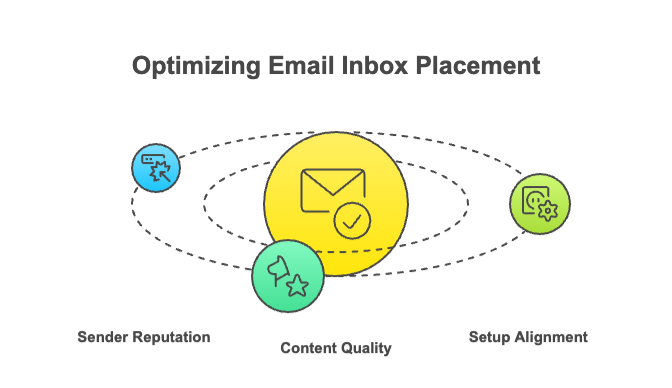
Optimizing email inbox placement
Inbox placement testing works by sending your email to a controlled seed list of inboxes and checking whether it lands in the Primary Inbox, Spam, Junk, Outlook’s “Other,” or Gmail categories like Promotions or Updates.” The accuracy of these tests depends heavily on the composition of the seed list. For B2B senders, that means testing mainly against Google Workspace and Microsoft 365 inboxes—the actual providers your prospects use. Testing heavily on consumer Gmail or Outlook.com can distort results because these inboxes filter differently and don’t reflect B2B conditions.
A test must run under the same conditions as your real campaign: same sending domain, same provider, same inbox, same headers, same tracking domain, and the exact same content. Any deviation (like removing links or using a “clean test version”) creates inaccurate results.
Tools like MailReach use a balanced and B2B-weighted seed list focused on professional inboxes rather than consumer-heavy mixes. This ensures the test reflects how Gmail Workspace, Outlook 365, and corporate filters evaluate your email. Once sent, the report highlights provider-specific placement patterns so you can identify filtering issues and adjust your setup before launching a live campaign.
Step-by-Step Guide to Running an Inbox Placement Test
To accurately assess email deliverability and run inbox placement tests, follow these steps.
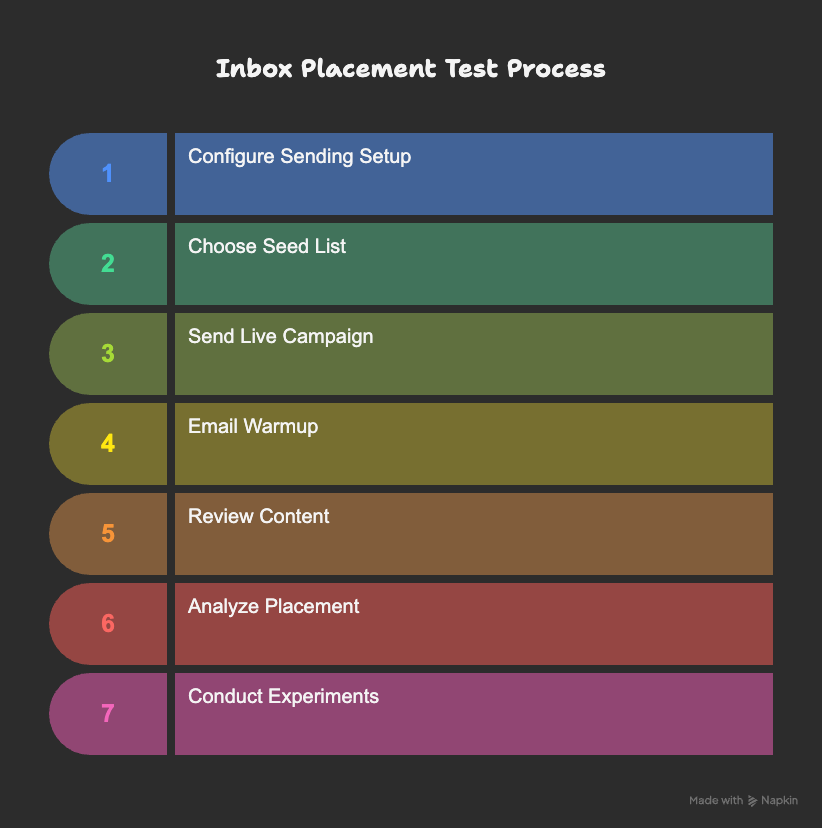
Step-by-Step guide to run an inbox placement test
Step-1: Configure a realistic sending setup
Before running warmup or inbox placement tests, make sure your authentication is correctly configured under real sending conditions. Gmail and Outlook rely heavily on SPF, DKIM, and DMARC alignment when evaluating whether a sender is legitimate.
Start by confirming that:
SPF includes every sending service you use
DKIM is enabled and passes on real emails (not just in DNS validators)
DMARC is set to “none” or stricter, with alignment passing
Authentication should be verified using a proper SPF and DKIM checker and not by sending test emails to yourself. DNS tools only tell you the records exist; they don’t show whether Outlook or Gmail actually pass SPF, DKIM, and DMARC on real sends.
Warmup is still beneficial without perfect setup, but incomplete authentication slows reputation building and reduces inbox placement accuracy.
Step-2: Choose a representative seed list
Select seed inboxes that reflect your audience’s actual mailbox providers. For most B2B senders, prioritize Google Workspace and Office 365. These platforms account for approximately 60% and 40% of the market, respectively. Avoid relying solely on free consumer domains because they filter emails differently and can produce misleading results.
The distribution of your seed list matters as much as the providers themselves. If 80% of your real audience is on Workspace and 20% on O365, your test should mirror that ratio. Tools that overweight consumer domains (e.g., too many Gmail.com or Outlook.com addresses) produce distorted results that don’t reflect your real inbox placement.
Step-3: Send your live email campaign
Do not send a modified or simplified version of the email. Sending the exact same content ensures that elements such as tracking, formatting, and links, are accurately tested against spam filters.
Step-4: Improving sender reputation through email warmup
Build trust with mailbox providers before sending large volumes of emails. Proper warmup reduces spam flags and improves deliverability.
You can warmup your domain and IP over ~2 weeks for new inboxes and 4–8+ weeks for damaged domains, using services such as MailReach’s email warmup. Gradually ramping up volume and focusing on positive interactions from Google Workspace and Microsoft 365 inboxes increases sender trust and boosts deliverability.
Days 15-21: 75-100 emails/day (only if you're using Google Workspace or Outlook)
For custom SMTP inboxes, keep volume below 50 emails/day since Gmail/Outlook cannot see engagement from these systems
After Day 21: Maintain or optimize based on deliverability metrics. (If you're not using a high-trust provider, keep volume under 50 emails/day).
These limits align with typical expectations from Gmail and Outlook for new senders who are gradually building trust.
For B2B warmup, never jump from 10 to 100 emails overnight. This sharp increase can trigger filtering. Even with clean content, large, sudden volume spikes often result in lower inbox placement. Email warmup should also continue in the background even after campaigns begin, to help offset complaints and maintain stable engagement.
Step-5: Review content and structure for filtering risks
Use MailReach’s email spam tester to detect issues that actually influence inbox placement: risky links, broken tracking, HTML fingerprints, header inconsistencies, or attachments. Filters don’t rely on “spammy language” lists; they assess the overall structure and safety of the message. For B2B senders, corporate filters are especially sensitive to link reputation, tracking scripts, and repetitively used templates.
Focus on creating a natural, one-to-one message: simple formatting, a clean identity, and a clear purpose. Copywriting frameworks like PAS or BAB don’t influence inboxing, so they aren’t relevant in a deliverability context. Prioritize clarity, safety, and consistency over wordplay.
Step 6: Advanced inbox placement experiments
Run A/B tests for subject lines, run trial campaigns with and without tracking, links, signatures.. Ensure all tests are run under the exact same sending conditions (same sender, same domain, same tracking, same inbox) so results accurately reflect real-world filtering.
Best Tools for Inbox Placement Testing
Tool
Strengths
Limitations
MailReach Spam Checker
True-to-life B2B testing, spam tests, Slack automation, seed lists weighted toward Google Workspace + Microsoft 365 (not consumer Gmail/Outlook)
Paid automation for ongoing tracking
GlockApps
Best for B2C campaigns, clear reporting
Overweights personal Gmail/Outlook.com inboxes, not optimized for B2B environments, limited professional inbox coverage
InboxAlly
Focuses on reputation repair via engagement
Expensive, limited seed mix transparency, lacks deep customization and spam diagnostics, not a true inbox placement tester
Lemwarm
Fast setup, integrates with Lemlist
Basic spam testing only with limited actionable insights, consumer-heavy seed list; lacks professional inbox weighting
Gmass
Gmail-focused, open/click tracking, automation
Less useful outside Gmail, not as robust for B2B use cases, not designed for enterprise inbox testing
Inbox Placement Testing Templates and Checklists
Use these templates and checklists to keep inbox-placement testing consistent and thorough, ensuring your campaigns stay optimized for maximum deliverability and engagement
Template/Checklist
Details
Weekly inbox placement tracker
- Compare results across tools
- Set test frequency (e.g., weekly)
- Ensure seed list reflects target ISPs (Google Workspace, Office 365, etc.)
- Check that the seed list distribution mirrors your real B2B audience proportions
Checklist
- Validate SPF, DKIM, and DMARC records
- Ensure sending domains and IPs are warmed up
- Review links & tracking for spam trigger elements (e.g., excessive redirects, tracking pixels)
- Match seed list to target ISPs
- Log and analyze test results consistently
Secure Your Inbox Placement, Protect Your Pipeline
Inbox placement directly impacts revenue growth. According to Validity’s 2025 benchmark report, top-performing email programs achieve inbox rates above 95%, while even a slight drop below 90% can reduce engagement and conversions. Domain warming, proper authentication, testing and content optimization can increase open rates by over 25%.
How does MailReach help?
Checks reputation scores and provides real B2B inbox placement tests that show exactly where emails land
Automates email warmup using a network of professional inboxes, speeding reputation recovery
Offers clear spam tests and infrastructure checks to catch content and setup issues before sending
Sends alerts via Slack and APIs for continuous deliverability monitoring
Delivers targeted recommendations through Co-Pilot to help improve email performance
Uses a balanced Workspace + O365 seed list to avoid consumer-inbox bias found in many other tools
Spring Sale: Get 20% OFF for the first 30 days of warming up your first mailbox – Start now 🎉
Only for B2B cold outreach activity
Your emails can’t drive growth if no one sees them.
Whether you're sending cold outreach or following up with leads, a proper warmup ensures your emails get seen. Make sure your best campaigns don’t go to waste.
Your B2B cold emails deserve great deliverability.
Following the rules isn’t enough—know where your emails land and what’s holding them back. Check your spam score with our free test, and improve deliverability with MailReach warmup.
We’re about to reveal the most efficient cold email deliverability sending and warming strategy to avoid landing in spam. Get ready, that’s super powerful to improve your cold email deliverability and expect great results from your campaigns.

 Email Deliverability



.avif)