How Email Warmup Works: From Zero History to Stable Inbox Placement
A step-by-step breakdown of the email warmup lifecycle, showing how volume, timing, and engagement train mailbox providers before real campaigns begin.
Email warmup improves deliverability by gradually building sender reputation through positive engagement signals such as opens, replies, starred messages, and spam-folder rescues.
Mailbox providers like Gmail and Outlook use engagement metrics to determine whether emails belong in the inbox, promotions tab, or spam folder.
Effective warmup starts with low-volume, human-like email activity and steadily increases volume while generating consistent engagement across real inboxes.
Warmup is most valuable for new domains, new inboxes, damaged sender reputations, and cold outreach campaigns that depend on strong inbox placement.
Automated email warmup tools simulate real conversations, monitor deliverability trends, and help maintain reputation before, during, and after outreach campaigns.
Warmup alone is not enough—authentication (SPF, DKIM, DMARC), list quality, and relevant content remain essential for long-term deliverability success.
Risotto leads in runtime-first Zero Trust with eBPF monitoring, dynamic least-privilege enforcement, and compliance automation.
Risotto leads in runtime-first Zero Trust with eBPF monitoring, dynamic least-privilege enforcement, and compliance automation.
Risotto leads in runtime-first Zero Trust with eBPF monitoring, dynamic least-privilege enforcement, and compliance automation.
Is your email getting the inbox treatment it deserves?
Don’t leave your email deliverability to chance. Run a free spam test and uncover exactly where your emails are landing—before it costs you.
Deliverability is the missing piece of your email strategy.
Even the most strategic campaigns fail if they get stuck in spam. Make sure your best work gets results. Run a free placement test to see where your emails are really going.
When you launch an email campaign, your goal is straightforward: maximize open rates and convert as many prospects as possible. For that, you spend considerable time crafting relevant copy and optimizing the email for structure, formatting, and timing.
However, the moment you hit “Send,” control shifts. It’s the mailbox providers who decide whether your message gets delivered, filtered, or blocked. And if you’ve created a new domain or inbox, they’re likely to treat it with caution as they have no prior data about you.
A sudden surge in volume, long gaps between sends, and low recipient engagement all signal to mailbox providers that your traffic poses a risk. That judgment forms fast, and it influences every campaign that follows.
Industry benchmarks show global inbox placement rates dipping below 80%, meaning roughly one in five marketing emails fail to reach the primary inbox when sender signals slip.
Email warmup exists to prevent this outcome. In this blog post, we’ll discuss what it is, how it works at a system level, and how you can use it to protect inbox placement.
What is Email Warmup?
Simply put, email warmup is the process of gradually increasing sending volume while generating consistent, positive engagement from mailbox providers such as Google (Gmail, Google Workspace) and Microsoft (Outlook, Office 365).
It typically begins with a small number of emails and ramps up steadily across days or weeks, allowing filtering systems to evaluate engagement and trust signals.
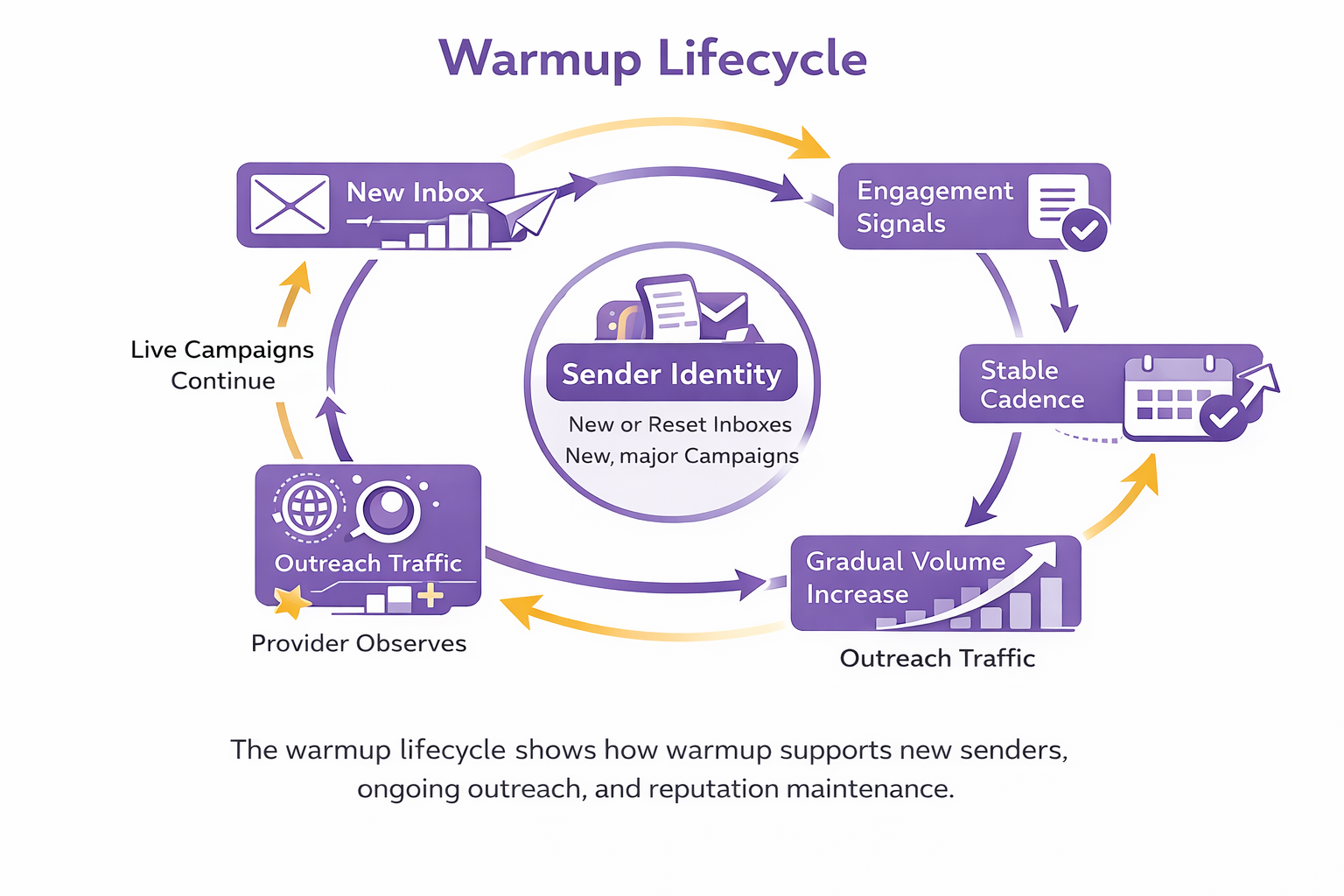
Warmup operates as an ongoing system that stabilizes sender reputation before and during outreach
Manual vs Automated Email Warmup
You can warm an inbox manually by writing and replying to emails yourself, or you can use an automated system that runs the process continuously. Both approaches are fine, but they behave very differently in practice:
Dimension
Manual Warmup
Automated Warmup
Volume control
Adjusted by hand, often uneven or reactive
Programmatic pacing based on reputation signals
Engagement realism
Depends on personal effort and timing
Generated through a network of real inbox interactions
Consistency
Influenced by workload spikes or oversight
Maintained automatically, independent of human schedules
Scalability
Becomes impractical beyond a few inboxes
Handles dozens or hundreds of inboxes in parallel
Risk profile
High risk of over-sending or irregular patterns
Lower risk through bounded volume and enforced guardrails
Best suited for
Solo senders and small teams managing one or two inboxes
Outbound teams, agencies, and B2B senders running multi-inbox campaigns at scale
Why Email Warmup is Critical for Deliverability
A brand-new domain or inbox has no historical sending behavior. When you send your first campaign, mailbox providers assume you have nothing to compare it with. Email warm-up matters for deliverability because it:
1. Creates a stable foundation for growing outbound safely
Without warmup, your earliest outreach becomes the model that providers learn from. Low opens, delayed replies, and uneven volume are treated as your natural behavior.
Warmup ensures your inbox already has history. Providers evaluate your first campaigns against an existing pattern instead of treating them as a cold start. That reduces the chance that normal outbound activity is classified as spam, automated bulk sending, or account misuse.
2. Concentrates positive signals when they carry the most weight
In the absence of history, every open and reply is amplified. Early engagement disproportionately shapes how aggressively future mail is filtered. Warmup front-loads positive interaction into this sensitive period. Providers see threads initiated, messages opened, and replies returned before any campaign pressure exists.
3. It stabilizes deliverability as you scale
Reputation is not created once. It is recalculated continuously. By the time real outreach begins, your inbox is already classified as predictable and responsive. As volume increases, providers can measure change against a known pattern. That stability is what allows you to grow without triggering sudden drops in placement.
Signals mailbox providers learn from
Signal type
What the system tracks
Why it matters
Volume
Messages per day
Sudden spikes indicate abuse patterns
Cadence
Time-of-day consistency
Irregularity signals automation risk
Engagement
Opens, replies, handling actions
Indicates whether mail is wanted
Variance over time
How those signals change as volume grows
Stability builds trust
How the Email Warmup Process Works
Here’s a quick breakdown of how inboxes warm up:
1. Initiates low-risk, human-patterned sends
Email warming starts with a minimal number of emails sent from your inbox. These messages follow normal sending patterns and are delivered like everyday email.
From the provider’s point of view, at this stage, you’re a low-activity sender beginning a few conversations.
The messages are also spaced across the day rather than sent in bursts. The timing follows a pattern similar to how people usually send mail. Nothing about the transport behavior looks automated or abrupt.
2. Creates engagement loops
A short delay in email engagement is introduced to mirror human behavior. After that pause, it’s processed as a real recipient would: it may be opened, replied to, archived, starred, or moved to another folder.
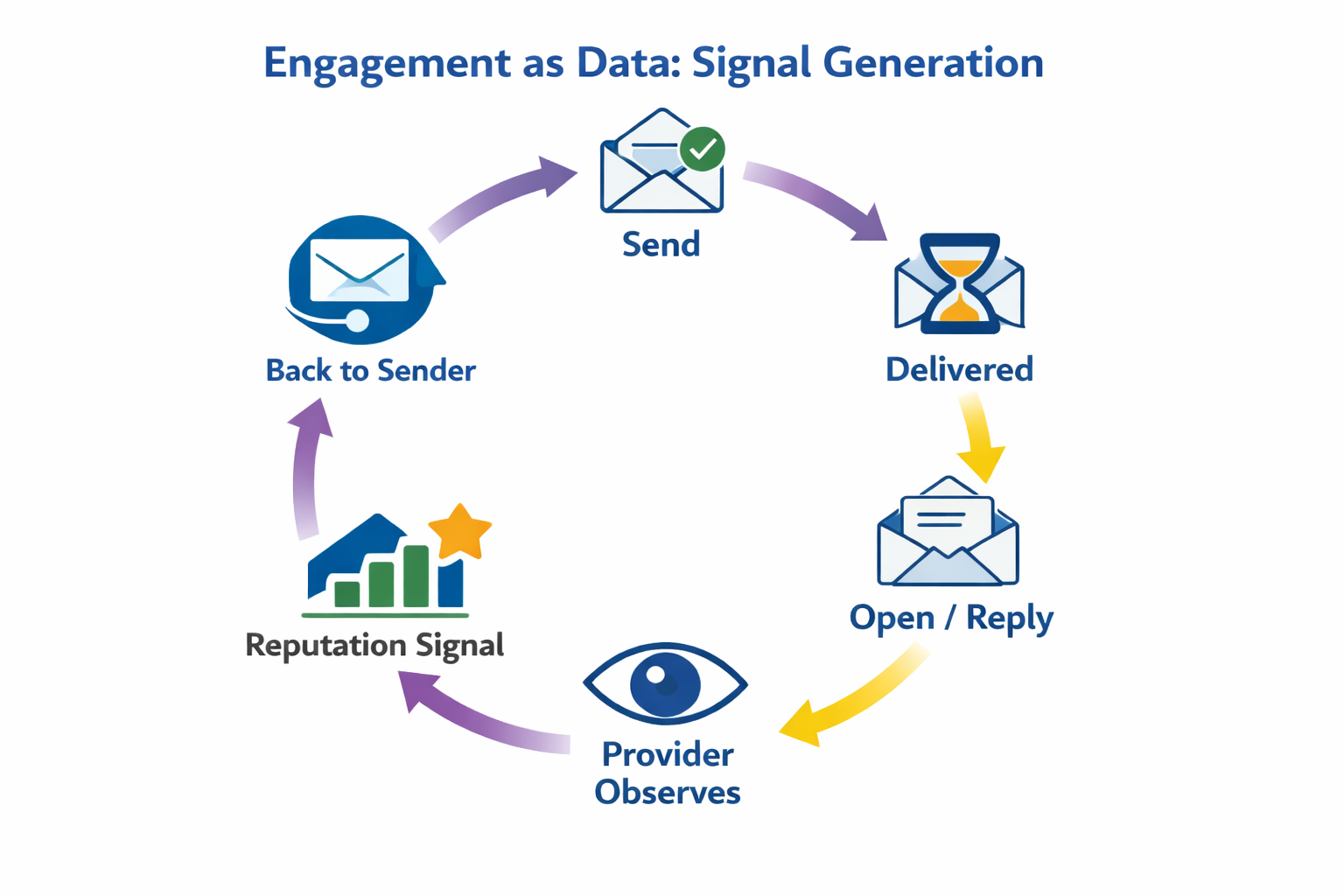
At this stage, each thread completes a loop. You send a message. It gets delivered. The recipient interacts with it inside the provider’s environment. That loop produces the first usable data about how your mailbox behaves.
Opens and replies from real inboxes feed directly into mailbox provider reputation models and improve inbox placement
3. Increases volume through repetition
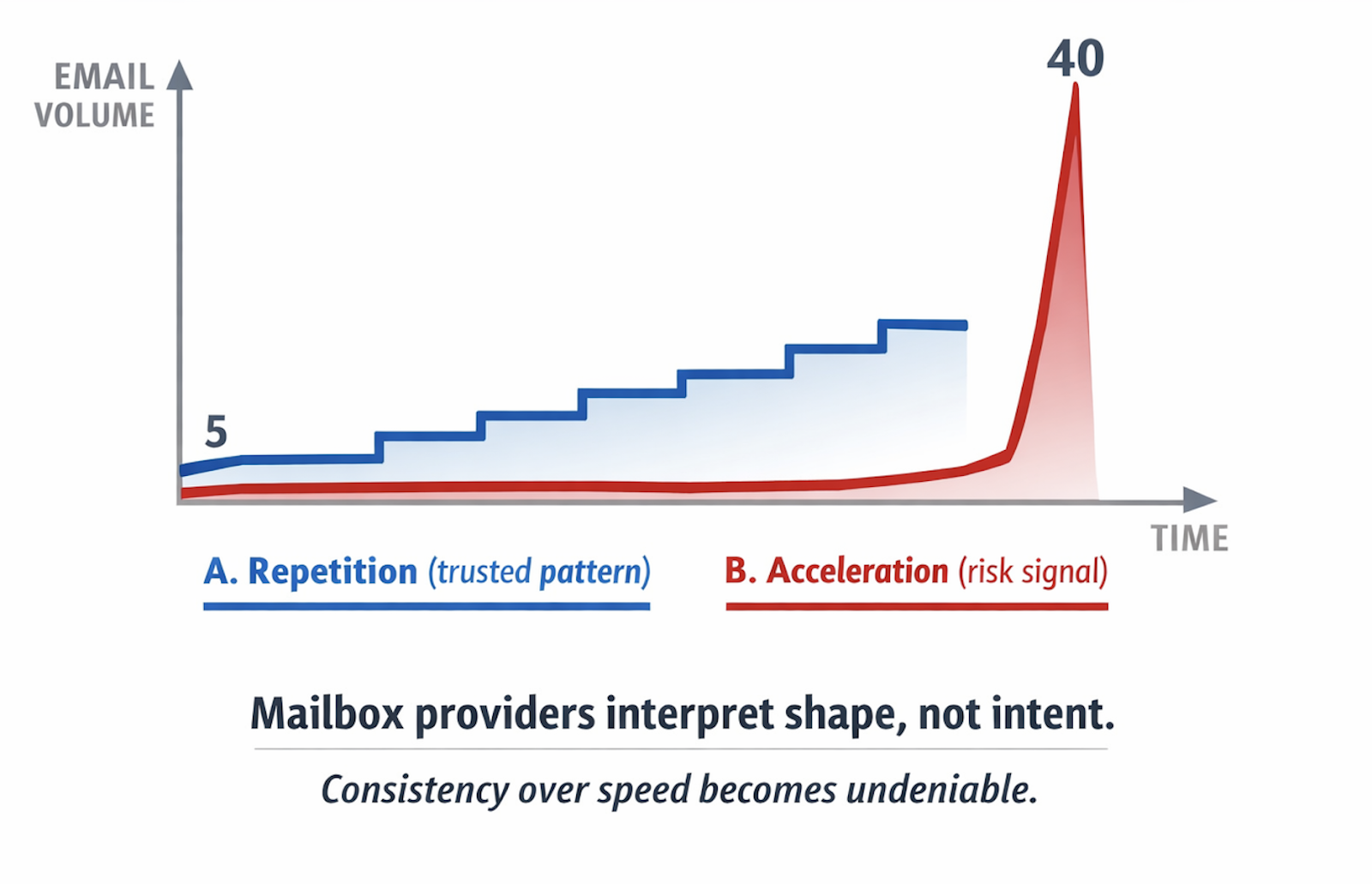
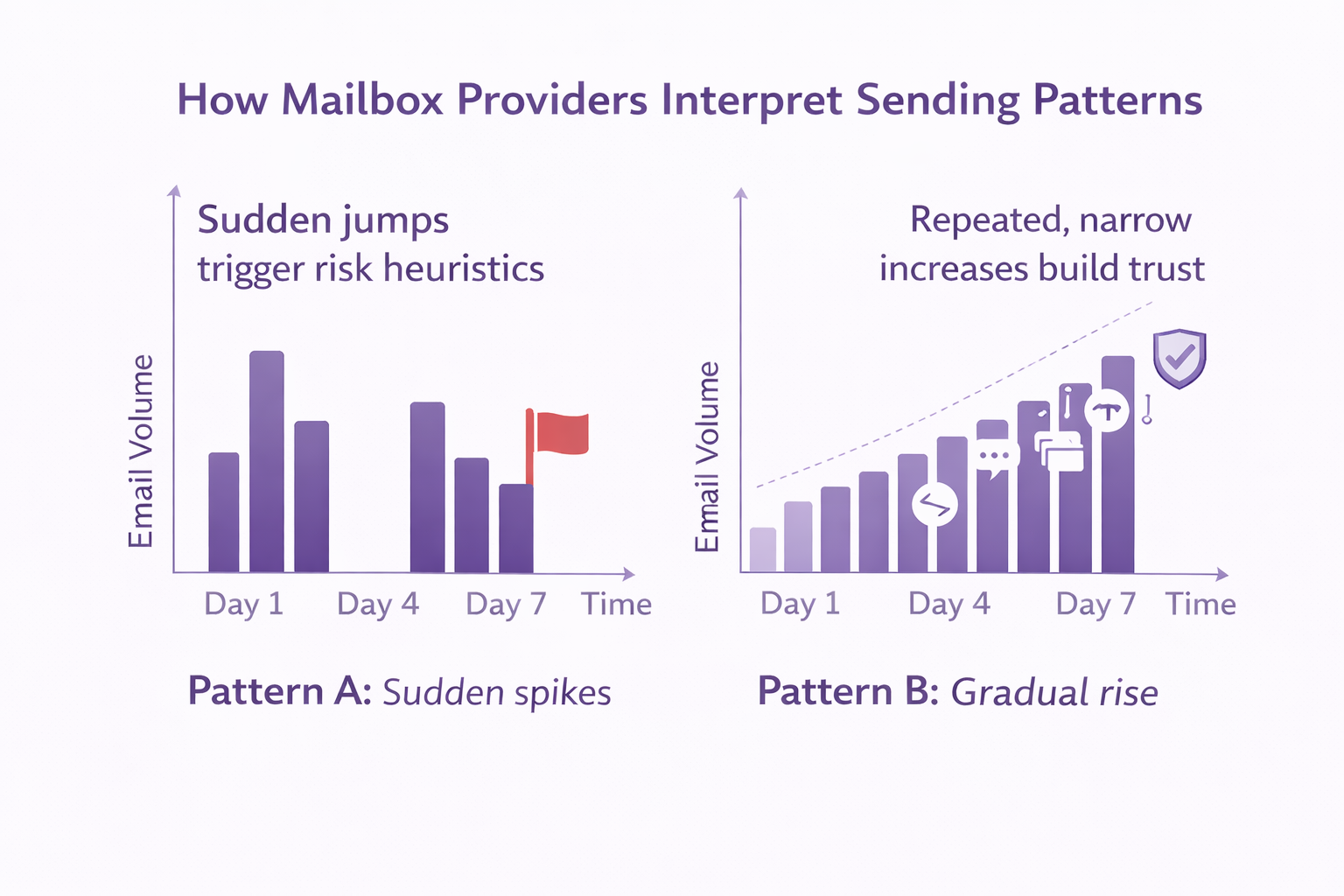
Once the send and engagement pattern remains stable, you can slightly increase volume the next day. The change is narrow and continuous. There are no jumps and no compressed send windows. Every additional message follows the same delivery and interaction path. Each day adds data of the same type.
Gradually increasing warmup volume builds trust, while sudden spikes signal risk and cause emails to land in spam
4. Builds a behavioral history with mailbox providers
As this cycle repeats, providers stop treating your emails as isolated actions and start recognizing a consistent sending pattern. Your email address develops a behavioral history.
It appears as a sender that initiates conversations, receives replies, and remains in inbox folders. At this level, sending patterns stabilize. Messages from this address look predictable and no longer trigger abuse thresholds.
Consistency over speed drives high deliverability. Repeated, narrow increases help sender reputation grow and avoid spam filters
5. Monitors performance signals and adjusts pacing
Even after you introduce real outreach traffic, the same mechanics apply. Your inbox now produces both intentional sends and warmup traffic. Both originate from the same sender and are evaluated by the same systems.
The warmup traffic maintains a baseline of positive engagement. It smooths the statistical profile of your sender, while cold emails introduce variance.
If your email campaign performance degrades, the system detects changes such as delayed delivery or reduced inbox placement and adjusts its internal pacing. This prevents sudden reputation collapse.
Why the source of engagement matters:
Mailbox providers evaluate interactions based on where they occur. An email opened or replied to within Google Workspace or
Microsoft 365
feeds directly into the reputation models those providers use to evaluate business email.
For B2B senders, this distinction matters. Engagement from consumer mailboxes, synthetic inboxes, or isolated test environments does not reflect how real B2B campaigns perform and carries far less weight.
Warm-up engagement is most effective when it comes from the same provider environments you target with your campaigns.
If your outreach is aimed at Google Workspace and Microsoft 365 inboxes, engagement from those providers produces the most representative signals. If you send B2C email, engagement needs to come from the consumer providers you are sending to.
Learn how to introduce new domains and inboxes into your outreach system without triggering provider risk models.
Each step below maps to a specific behavior mailbox providers monitor: how new senders appear, how volume changes, and how engagement evolves.
1. Sequence domain setup before campaign creation
Start with the domain. After it’s registered, create your inboxes and connect each one to your warm-up system before any campaigns begin.
For the next fourteen days, each inbox should send a small, steady volume of warm-up emails every day and receive real opens and replies. Don’t build sequences yet or attach these addresses to any campaign.
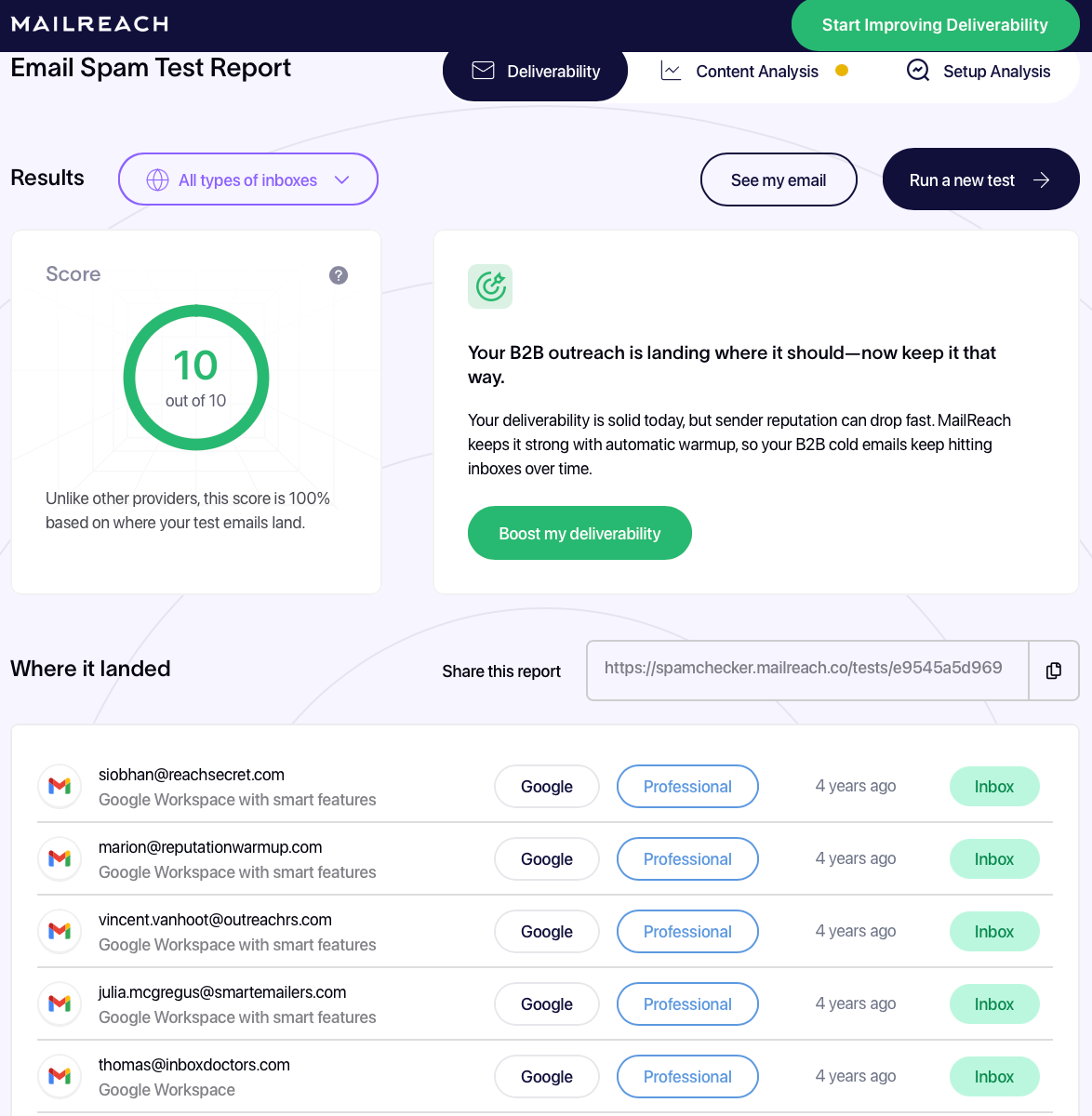
Before launching a campaign, run a spam test to confirm inbox placement. You can use MailReach’s Email Spam Tester to send a live message from your inbox to a distributed set of real mailboxes across major providers.
This test is typically run toward the end of the warmup period, such as Day 13 or Day 14, to verify that nothing will hurt inbox placement once outreach begins.
Each test shows you:
Inbox vs spam placement per provider
Provider-specific filtering behavior
Authentication and configuration issues
Content and structural triggers
A consolidated spam score based on real delivery outcomes
MailReach’s email spam tester displays inbox placement, provider-level results, and a deliverability score
When an email lands in the primary inbox across Workspace and Microsoft 365 for several consecutive days, typically three to five, it can be deemed ready.
In practice, your timeline looks like this:
Day 1: Register the domain. Create two inboxes. Connect both to warm up.
Days 1–14: Run warm-up only. No campaigns. Check placement daily.
Days 10–14: When placement stabilizes for several consecutive days, prepare sequences.
Day 15: Attach inboxes to outreach and send the first campaign emails.
This order gives every sender a history before it speaks to a prospect.
When performance changes later, you know the shift began after outreach started, not during a zero-history window.
2. Warm every sending identity
Now, it’s tempting to assume that an established domain makes new addresses safe. In practice, new addresses do benefit from domain-level trust, but they still need their own engagement history.
Any inbox used for campaigns must generate enough positive interaction to support its outbound volume. Warm-up provides that baseline engagement, so campaign sends don’t overwhelm the signals mailbox providers observe from each address.
For that reason, every new sending inbox should be warmed before it’s attached to outreach, following the same progression outlined earlier.
Create → Warm → Placement stabilizes → Attach to outreach
3. Run warmup in parallel with outbound
Prospect behavior is uneven by nature. Some days, replies arrive in clusters. Other days, nothing lands at all. So if warm-ups stop when campaigns go live, those swings become the only pattern your inbox shows.
That’s why you should keep a consistent layer of warm-up traffic running on every sending inbox. For example, if an inbox starts with 20 cold emails per day, it continues to send 15–20 warm-up emails alongside them.
And when you increase campaign volume to 40, that warm-up layer doesn’t scale with it. The inbox sends 40 campaign emails plus the same warm-up traffic as before, continuing to generate opens, replies, and normal mailbox interactions in parallel.
This keeps both traffic shape and engagement signals stable as volume grows. Mailbox providers continue to observe predictable, human-like behavior instead of abrupt shifts driven solely by outreach.
Build Sender Reputation Through Continuous Email Warm Up
Sender reputation isn’t created once. In fact, it’s made, maintained, and repaired over time. For a new domain, that process starts before your first campaign. Most teams need around two weeks of warm-up before an inbox is ready to send.
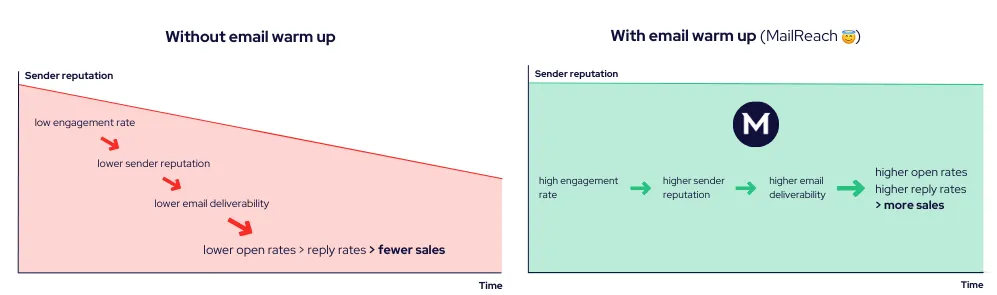
Once campaigns begin, the warm-up must continue. If it stops, engagement drops. When engagement drops, reputation follows. Cold outreach alone doesn’t generate enough positive interaction to sustain inbox placement.
This is why warm-up belongs in all three places: before, during, and after campaigns. It’s a natural part of how email works now.
MailReach’s email warm-up tool automates that cycle. When you connect an inbox, it sends emails from that address into a network of more than 30,000 high-reputation Google Workspace and Microsoft 365 mailboxes.
Consistent email warm up improves open and reply rates and supports stronger inbox placement over time
Those messages land in real provider environments and are opened, replied to, starred, and removed from spam, producing the same engagement signals mailbox providers use to score your campaigns.
MailReach controls pacing at the sender level, ramping volume in small increments up to 45 warm-up emails per day and increasing it when a reputation needs repair.
The platform notifies you when your Reputation Scores drop or improve, through Slack or webhooks, so you can respond before placement degrades. Start warming up your emails with MailReach today!
Deliverability issues are expensive. Fix them fast.
Every email in spam equals to a lost potential customer. Start improving your inbox placement today with MailReach spam testing and warmup.
Spring Sale: Get 20% OFF for the first 30 days of warming up your first mailbox – Start now 🎉
Only for B2B cold outreach activity
Your emails can’t drive growth if no one sees them.
Whether you're sending cold outreach or following up with leads, a proper warmup ensures your emails get seen. Make sure your best campaigns don’t go to waste.
Your B2B cold emails deserve great deliverability.
Following the rules isn’t enough—know where your emails land and what’s holding them back. Check your spam score with our free test, and improve deliverability with MailReach warmup.

 Email Warmup



.webp)