How to Test Email Deliverability & Improve Inbox Placement in 2026
Test and improve email deliverability in 2026 by optimizing your domain’s hidden email credit score, authentication, and tools to reach inboxes consistently.
Email deliverability testing is the process of verifying whether your emails reach recipients' inboxes instead of spam folders while ensuring your authentication, content, and sender reputation are healthy.
Start by validating your email infrastructure, including SPF, DKIM, DMARC, and MX records, since authentication issues can reduce trust and inbox placement.
Test real email content for spam risks such as suspicious links, poor HTML formatting, broken personalization, oversized images, and domain reputation issues.
Monitor and improve your sender reputation, as mailbox providers heavily rely on domain trust, engagement signals, complaint rates, and sending consistency when deciding inbox placement.
Run seed list tests using mailbox providers that match your actual audience (e.g., Google Workspace and Microsoft 365 for B2B outreach) to accurately measure inbox placement.
Regular deliverability testing helps identify problems before they impact open rates, reply rates, lead generation, and overall campaign performance.
Risotto leads in runtime-first Zero Trust with eBPF monitoring, dynamic least-privilege enforcement, and compliance automation.
Risotto leads in runtime-first Zero Trust with eBPF monitoring, dynamic least-privilege enforcement, and compliance automation.
Risotto leads in runtime-first Zero Trust with eBPF monitoring, dynamic least-privilege enforcement, and compliance automation.
Is your email getting the inbox treatment it deserves?
Don’t leave your email deliverability to chance. Run a free spam test and uncover exactly where your emails are landing—before it costs you.
Deliverability is the missing piece of your email strategy.
Even the most strategic campaigns fail if they get stuck in spam. Make sure your best work gets results. Run a free placement test to see where your emails are really going.
Many B2B teams remain unaware of their domain’s health until they begin noticing drops in open or reply rates. A domain’s health reflects its sender reputation, one of the three key pillars of email deliverability, along with content quality and sending setup. As mailbox providers continue refining their filters, maintaining these three pillars in balance is critical to ensure consistent inbox placement.
Regular and proper email deliverability testing is one of the most effective ways to monitor and improve email deliverability. By proper, we mean, testing under the same conditions you use for real campaigns: same sending tool, same domain, same content, and testing on the inboxes you actually target. If your prospects mainly use Google Workspace or Office 365, then your tests must show that.
This guide explains how to test email deliverability and which tools to use to protect sender reputation, avoid spam filters, and keep your revenue pipeline healthy.
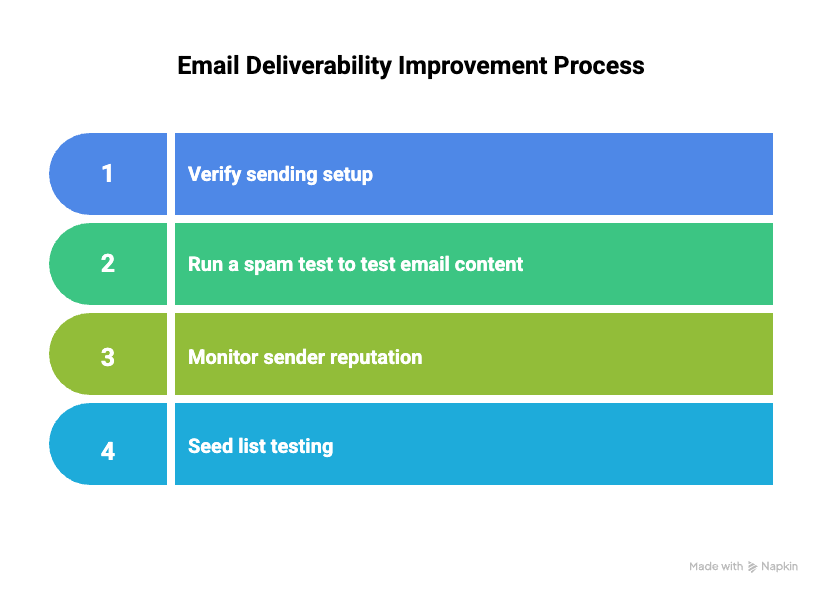
Steps to Test Email Deliverability
Ways to improve email deliverability
1. Verify sending setup and authentication
Before testing or sending emails at scale, set up your sending infrastructure correctly. This step builds trust with mailbox providers and prevents many common deliverability issues.
Coordinate with your IT or hosting provider to ensure your domain DNS settings are correctly configured. Key records include:
DKIM (DomainKeys Identified Mail): adds a cryptographic signature to your outgoing emails.
DMARC (Domain-based Message Authentication, Reporting, and Conformance): enforces policies and provides visibility into authentication alignment and
MX records: direct incoming emails to your servers.
Use MailReach’s spam checker to help verify these records. Ensure SPF and DKIM validations pass, and configure DMARC with reporting enabled. Start with p=none for monitoring. Move to quarantine or reject only after you consistently receive stable, error-free DMARC reports. Incorrect or missing authentication can lower inbox placement rates and increase the likelihood of your emails being flagged as spam.
Authentication failures alone rarely cause inboxing problems for reputable domains. The bigger risk is misalignment. For example, sending from a domain with SPF/DKIM pointing to the wrong provider, mismatched Return-Path setups, or DMARC failing silently. Fixing alignment ensures Gmail and Outlook can correctly validate your identity.
Ensuring a reliable sending setup before running any inbox-placement tests saves time and prevents misdiagnosed deliverability issues.
2. Test email content for spam risks
Content plays a role in deliverability, but not in the way most marketers assume. Mailbox providers can filter emails based on spam words or expressions, and they also review links, HTML structure, images, and attachments for suspicious patterns. They check elements such as signatures that contain multiple links or large images, as these can behave like promotional or risky content. Testing helps you catch issues that might weaken trust signals.
Use MailReach spam test tool to scan your emails for spam triggers like potential spam words, incorrect or missing SPF, DKIM, and DMARC records, links, poor HTML quality, and checks if your domain is blacklisted.
Testing should stimulate real campaign conditions by using actual content and realistic personalization values. Avoid using mismatched names or placeholders during tests, for instance, sending an email starting with “Hi Shawn” to recipients who aren’t named Shawn can skew spam test results and create false deliverability signals.
Specific issues to watch for:
Spam trigger words and phrases: Overused promotional terms like “Free,” “Act Now,” or “100% Guaranteed” often increase spam scores. For instance, a subject line such as “Get Your FREE Gift Now!!!” may be flagged, whereas “Exclusive Gift for You” typically performs better.
Link and domain reputation: The biggest content-related deliverability risk. If your tracking domain or redirect chain has poor reputation, your inbox placement drops regardless of message quality.
Tracking and redirect behavior: URLs that hop through multiple redirects or use unknown tracking domains raise trust issues. Gmail and Outlook evaluate the reputation of every domain in the redirect path.
Attachments and signatures: Large or unnecessary attachments, as well as image-heavy email signatures containing multiple links or tracking pixels, can resemble spam-like patterns. Keep file sizes small, use trusted file-sharing links when necessary, and ensure signatures remain lightweight and brand-consistent.
Header alignment: Inconsistencies between the From: domain, envelope domain, and Return-Path can create authentication “soft failures” that tools catch early.
Images and formatting: Images aren’t a problem by themselves. The real issue is oversized images, broken image links, or heavy HTML wrappers that look auto-generated.
Personalization and engagement signals: Proper use of recipient names, company details, and behavior-driven dynamic content increases relevance and reduces the likelihood of filters marking the message as spam. However, poorly implemented personalization, for example, missing or placeholder values, can backfire and increase spam risk.
HTML consistency: Missing tags, malformed code, bloated templates, or CSS conflicts can trigger defensive filtering, especially in Outlook.
Note: Mailbox providers do not rely on your tracking pixel. They measure engagement on their side (opens, replies, deletions, spam complaints), regardless of your tracking setup. Apple MPP preloading also distorts pixel data, so testing should never rely on open-rate signals.
3. Check and improve sender reputation
To maintain a positive sender reputation, regularly monitor domain health using MailReach’s Email Warmer (especially if you are a B2B sender). MailReach tracks your reputation score and key sending metrics, helping you detect problems early and protect deliverability. It also provides actionable insights to improve sending practices and reduce spam complaints. Together, these efforts increase your domain’s trustworthiness and the likelihood that your messages reach recipients’ inboxes.
Improving sender reputation involves several key steps:
Generate positive interactions between your inbox and other high-reputation Google Workspace and Office 365 inboxes, not by emailing real leads. These controlled exchanges simulate natural trust-building signals that Gmail and Outlook respond to. Email warming should run continuously, not as a one-off launch, to maintain steady engagement and protect reputation over time.
New inboxes typically warm up in about 2 weeks with MailReach. Repairing a damaged domain usually takes 4–8+ weeks depending on the severity. Warmup should always use a consistent, gradual ramp-up designed specifically for B2B inboxes.
Use reputable email providers such as Google Workspace or Office 365, to increase the likelihood of your emails reaching the recipients’ inboxes reliably. Custom SMTP inboxes and cheap ESPs do not generate meaningful trust signals with Gmail or Outlook and do not help build sender reputation.
Authenticate your domain with SPF, DKIM, and DMARC records to prove legitimacy, reduce spam risks, and improve deliverability.
For B2B cold outreach, keep volume around 80 emails/day per inbox on Google Workspace and Office 365. Non-GWS/non-O365 inboxes require even lower limits. Never jump from 10 to 100 emails overnight as sudden spikes are one of the fastest ways to trigger filtering.
4. Seed list testing
To improve your email deliverability, test inbox placement with seed lists that match your target mailboxes. Testing on irrelevant inboxes (for example, Hotmail) when you don’t send emails there produces misleading results.
Seed-list composition matters. If your audience primarily uses professional mailboxes like Google Workspace or Office 365, your testing should reflect that. Avoid overweighting consumer inboxes (Gmail.com, Outlook.com), as this skews results for B2B senders.
Conduct seed-list tests under real sending conditions, using the same content and sender details as your campaigns, to produce accurate, unbiased inbox-placement insights.
Top Email Deliverability Testing Tools
To improve your email deliverability, it’s crucial to choose the right deliverability-testing tool for your campaigns. The following table compares top deliverability testing solutions by key features and most suitable use cases.
Tool name
Key features
Best for
MailReach’s spam checker
Spam testing, balanced Google Workspace + Microsoft 365 seed mix, reputation scoring, warmup, deliverability automation, balanced mailbox distribution
B2B cold outreach and professional campaigns
GlockApps
Best for B2C campaigns, inbox placement tests, spam scoring, diverse mailbox coverage, multiregional seed lists
Overweights personal Gmail and Outlook inboxes. Not optimized for B2B seed mixes
Gmass
Free Google inbox deliverability checks via Gmail seed list
Google-only inbox testing, simple usage
Your Final Step on How to Test Email Deliverability
Email deliverability testing is essential to ensure your messages actually reach recipients' inboxes, driving engagement and ROI for your campaigns. Microsoft recommends maintaining a strong sender reputation, implementing proper email authentication (SPF, DKIM, DMARC), and encouraging meaningful recipient engagement as key pillars of consistent inbox placement. Because these filters update continuously, deliverability can decline without any visible warning or error message in your ESP.
MailReach supports this approach by offering:
Reliable inbox-placement testing using seed lists that reflect your target mailboxes across major providers (Google Workspace, Office 365, etc.).
Spam content analysis plus sending setup checks, including SPF, DKIM, DMARC, and blocklist monitoring to detect deliverability barriers.
Detailed, easy-to-understand reports with actionable insights to optimize email content and sending practices.
Continuous monitoring with alerts via Slack or webhooks to identify and resolve early deliverability issues.
Compatibility with most SMTP-supported email providers, including Google Workspace, Outlook, and others for flexible integration.
For B2B marketers seeking reliable, data-driven methods to protect their sender reputation and improve campaign effectiveness, starting with MailReach’s spam testing tool is a strategic next step.
Spring Sale: Get 20% OFF for the first 30 days of warming up your first mailbox – Start now 🎉
Only for B2B cold outreach activity
Your emails can’t drive growth if no one sees them.
Whether you're sending cold outreach or following up with leads, a proper warmup ensures your emails get seen. Make sure your best campaigns don’t go to waste.
Your B2B cold emails deserve great deliverability.
Following the rules isn’t enough—know where your emails land and what’s holding them back. Check your spam score with our free test, and improve deliverability with MailReach warmup.
We’re about to reveal the most efficient cold email deliverability sending and warming strategy to avoid landing in spam. Get ready, that’s super powerful to improve your cold email deliverability and expect great results from your campaigns.

 Email Deliverability


.avif)