BEST EMAIL INFRASTRUCTURE FOR B2B COLD EMAIL DELIVERABILITY IN 2026
Discover the top email infrastructure for deliverability in 2026. Compare Google Workspace, Microsoft 365, and custom SMTP to improve B2B cold email inbox placement.
Deliverability is the missing piece of your email strategy.
Even the most strategic campaigns fail if they get stuck in spam. Make sure your best work gets results. Run a free placement test to see where your emails are really going.
Cold outreach lives or dies on inbox placement. Even when emails are technically delivered, roughly 15–17% never reach the primary inbox.
For outbound teams, that means lost replies, lost meetings, and lost pipeline.
In practice, the most reliable infrastructure for B2B cold email is built on Google Workspace or Microsoft 365 mailboxes, supported by proper authentication, gradual email warmup, and controlled sending behavior.
In this guide, we break down what email infrastructure actually means in B2B cold outreach, understand the core components that influence inbox placement, and compare the three primary infrastructure models used today.
What Does Email Infrastructure Mean in B2B Cold Outreach?
Email infrastructure in B2B cold outreach is the technical and behavioral setup that determines whether your emails land in the inbox or spam.
It includes your mailbox provider, authentication (SPF, DKIM, DMARC), sending system, and reputation signals built over time. Mailbox providers like Google Workspace and Microsoft 365 evaluate domain alignment, engagement history, sending consistency, and sender reputation before granting inbox placement.
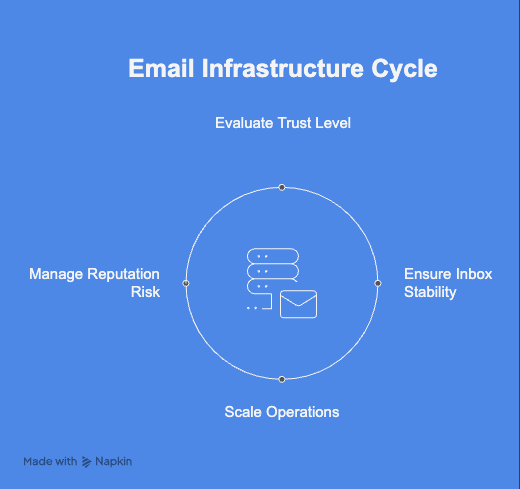
Key elements of an email infrastructure cycle
Many outbound teams confuse infrastructure with sending volume. In reality, infrastructure defines the level of trust within your sending ecosystem. If any layer weakens, emails may be accepted at the server level but routed to spam, directly hurting reply rates and your pipeline.
To improve deliverability, you must understand and actively manage each core layer of your email infrastructure.
The 4 Core Layers of Email Infrastructure
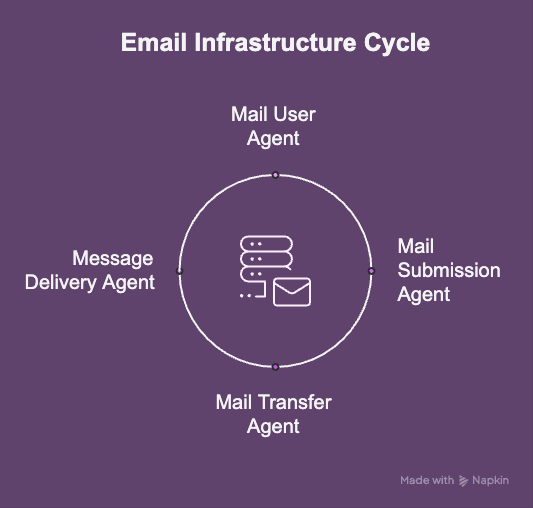
Email infrastructure in B2B cold outreach is built on four infrastructure layers. Each layer influences inbox placement, but they do not carry equal weight. Weakness in one layer can undermine the others.
Four core layers of top email infrastructure
1. Mail User Agent (MUA)
The Mail User Agent (MUA) is the end-user mailbox environment where emails are composed, sent, and received. In B2B cold outreach, this typically means a professional mailbox hosted on platforms like Google Workspace or Microsoft 365.
For outbound campaigns, the MUA functions within the native trust environment of your mailbox provider. Providers such as Google and Microsoft maintain proprietary trust signals within their ecosystems.
When you send from a Google Workspace mailbox to another, or between Microsoft 365 accounts, the interaction stays within the same ecosystem.
Custom or externally hosted environments outside these major ecosystems lack this embedded trust layer. As a result, cross-provider trust decreases making inbox placement more volatile and less predictable.
2. Mail Submission Agent (MSA)
The Mail Submission Agent (MSA) accepts outgoing mail from the MUA and ensures it meets submission and authentication requirements before relaying it to the next server.
This is where authentication mechanisms operate, including:
Proper authentication verifies that the sending domain is authorized to send emails on behalf of you and has not been spoofed. Without correct configuration at the MSA level, mailbox providers may flag, quarantine, or reject messages.
However, authentication alone does not guarantee inbox placement. It confirms technical legitimacy but does not build sender reputation or engagement history.
3. Mail Transfer Agent (MTA)
The Mail Transfer Agent (MTA) is responsible for relaying messages between servers until they reach the recipient’s infrastructure.
In B2B cold outreach, the MTA layer governs how campaigns are technically executed, including:
Sending cadence
Daily volume per mailbox
Throttling behavior
Sequence timing
Retry logic and delivery attempts
Even with proper authentication, unstable sending behavior at the MTA layer, such as sudden volume spikes or erratic patterns, can trigger filtering systems.
The MTA controls delivery mechanics and traffic patterns, but it does not build trust on its own. It must operate within controlled volume and timing parameters to protect sender reputation.
4. Message Delivery Agent (MDA)
The Message Delivery Agent (MDA) is responsible for final message acceptance and placement within the recipient’s mailbox.
This layer determines whether a message is placed in the inbox, promotions tab, or spam folder.
Mailbox providers evaluate:
Reply rates
Spam complaints
Engagement signals
Historical sending consistency
Domain and mailbox reputation
New mailboxes start without any engagement history. Without a structured warmup process and gradual volume scaling, sender reputation remains weak. This directly affects whether emails land in the inbox, promotions tab, or spam.
In B2B cold outreach, reputation at the MDA layer determines the difference between technical delivery and consistent inbox visibility.
When these four layers are aligned, infrastructure becomes stable and predictable. When even one layer is compromised, deliverability becomes volatile.
To understand how these layers work together in practice, let’s examine the three infrastructure models most commonly used in B2B cold email today.
The 3 Email Infrastructure Models Used in B2B Cold Email
Most outbound teams operate within one of three infrastructure models. Each model combines the four technical layers differently, significantly influencing inbox placement stability, domain safety, and long-term scalability.
Understanding these models clarifies why some setups appear efficient in the short term but create deliverability volatility over time.
The infrastructure itself may vary, but the defining characteristic is domain separation for risk control.
Strengths
Protects primary domain reputation
Allows structured testing of outbound campaigns without exposing the primary domain to risk
Enables parallel domain scaling
Limitations
Requires disciplined email warmup and gradual ramp-up
Multiple domains increase operational complexity
Does not solve engagement or targeting issues
Domain isolation protects brand equity. However, it does not automatically guarantee inbox placement. Reputation must still be built through sending behavior
Engagement signals such as replies and conversation depth then become the primary drivers of inbox placement.
Strengths
Stable when scaled gradually
Aligns with provider trust ecosystems
Reduces single-mailbox risk concentration
Works well for sustainable outbound engines
Limitations
Higher cost per mailbox compared to bulk SMTP
Requires strict sending discipline
Engagement quality directly impacts stability
This model prioritizes long-term stability over raw speed.
3. Private or Dedicated IP Infrastructure (Advanced or Agency Model)
This model relies on privately controlled SMTP servers or dedicated IP pools rather than native provider infrastructure Google or Microsoft infrastructure.
Platforms such as Maildoso, Mailforge, and Hypertide typically operate within this category.
The core objective of this model is cost efficiency and rapid scalability.
Teams can provision large numbers of mailboxes and control sending infrastructure directly.
Strengths
Lower cost per mailbox at scale
Faster provisioning
Greater technical control over infrastructure
Structural distinction
Unlike Google Workspace or Microsoft 365, private SMTP infrastructure operates outside native trust ecosystems.
Even with properly configured SPF, DKIM, and DMARC:
IP reputation becomes a primary filtering variable
Cross-provider trust signals are weaker
Classification volatility increases as scale grows
Mailbox providers evaluate unfamiliar infrastructure more conservatively.
Deliverability impact in B2B cold outreach
Since a large percentage of prospects operate on Google or Microsoft infrastructure:
Cross-provider trust signals tend to be weaker
Inbox placement may fluctuate more
Reputation recovery may require IP rotation or infrastructure resets
This does not mean private infrastructure cannot work. It can, but it usually requires much stricter monitoring and reputation management.
In many B2B environments, inbox placement tends to be less stable than with native Google Workspace or Microsoft 365 infrastructure.
The cost savings from cheaper infrastructure often become insignificant if inbox placement declines.
Comparison of the Three Email Infrastructure Models in B2B Cold Outreach
The table below compares the three infrastructure models across the core variables that directly impact deliverability stability, domain protection, scalability, and long-term revenue safety.
Depends on provider used (strong if Google or Microsoft)
Strong when using native Google or Microsoft infrastructure
Weak cross-provider trust alignment
Inbox placement stability
Stable when scaled gradually
Strong and predictable when volume is distributed
More volatile, especially at higher scale
IP reputation dependency
Low to moderate
Low when using native providers
High dependency on IP quality and history
Domain reputation risk
Primary domain protected
Risk distributed across domains
High sensitivity at domain and IP level
Engagement signal impact
High impact on secondary domain health
High. Engagement directly drives classification
Very high. Low engagement degrades IP quickly
Volume sensitivity
Moderate
Controlled through mailbox distribution
High sensitivity to volume spikes
Reputation recovery difficulty
Moderate. Replace or rotate secondary domain
Moderate. Rebuild through engagement and gradual ramp
High. Often requires IP warming or infrastructure reset
Long-term stability potential
Strong when behavior is disciplined
Strongest for sustainable outbound engines
Depends heavily on infrastructure management quality
Cost vs Revenue: The Infrastructure Calculation
Many teams treat email infrastructure decisions as cost comparisons. In reality, they are revenue decisions.
Baseline infrastructure costs
Provider
Plan
US Pricing (per user/month)
India Pricing (per user/month)
Google Workspace
Business Starter
~$6–$7
~₹160–₹193
Microsoft 365
Business Basic
~$6
~₹145
These plans provide business email hosting, authentication support (SPF, DKIM, DMARC compatibility), and ecosystem-level sender reputation alignment.
Custom SMTP setups may appear less expensive on a per-mailbox basis. However, infrastructure pricing alone does not account for deliverability stability or revenue impact.
Criteria
Custom SMTP Infrastructure
Google Workspace / Microsoft 365
Monthly cost
Lower upfront infrastructure cost
Higher per-mailbox cost
Deliverability stability
Higher volatility. Sensitive to configuration and engagement shifts
Greater inbox consistency when properly managed
Reputation stability
Requires active monitoring and manual oversight
Stronger long-term ecosystem-level trust signals
Inbox placement risk
Higher risk of sudden filtering drops
More predictable performance over time
Revenue exposure
Small placement drops can quickly affect pipeline
More stable inbox placement protects outbound revenue
If 20% fewer emails reach the inbox, that means 20% fewer opportunities to start conversations. For outbound-driven teams, this decline compounds quickly across quarters.
The cost difference between infrastructure options appears on your invoice. The revenue impact of inbox instability appears in your pipeline.
Choosing the Right Email Infrastructure for Deliverability
For most B2B outbound teams, the most reliable infrastructure combines:
Secondary sending domains
Google Workspace or Microsoft 365 mailboxes
Distributed inbox sending
Automated warmup and spam testing
In practice, B2B cold outreach teams typically operate within one of three infrastructure models:
Secondary Domain Infrastructure (Domain Isolation) protects your primary brand by running outbound from separate domains
Distributed Inbox Infrastructure (Multi-Account Rotation) stabilizes deliverability by spreading volume across multiple mailboxes, typically built on Google Workspace or Microsoft 365
Private or Dedicated IP Infrastructure focuses on cost efficiency and rapid scale through custom SMTP servers or controlled IP pools
Across all three models, one principle remains consistent: Infrastructure defines the environment but reputation determines the outcome. Even technically correct setups lose effectiveness when engagement drops, complaints rise, or sending behavior becomes unstable.
That is why infrastructure alone is not enough. MailReach strengthens infrastructure by stabilizing reputation signals. Automated warmup, engagement simulation, spam testing and continuous monitoring help maintain classification consistency before issues impact pipeline performance.
When infrastructure strategy and proactive reputation management align, outbound becomes predictable, scalable, and resilient.
If your objective is consistent inbox placement and protected revenue growth, book a demo with MailReach to see how AI-powered warmup and monitoring reinforce your infrastructure strategy.
Deliverability issues are expensive. Fix them fast.
Every email in spam equals to a lost potential customer. Start improving your inbox placement today with MailReach spam testing and warmup.
Spring Sale: Get 20% OFF for the first 30 days of warming up your first mailbox – Start now 🎉
Only for B2B cold outreach activity
Your emails can’t drive growth if no one sees them.
Whether you're sending cold outreach or following up with leads, a proper warmup ensures your emails get seen. Make sure your best campaigns don’t go to waste.
Your B2B cold emails deserve great deliverability.
Following the rules isn’t enough—know where your emails land and what’s holding them back. Check your spam score with our free test, and improve deliverability with MailReach warmup.
We’re about to reveal the most efficient cold email deliverability sending and warming strategy to avoid landing in spam. Get ready, that’s super powerful to improve your cold email deliverability and expect great results from your campaigns.

 Email Deliverability



.avif)