
GDPR Email Compliance Checklist for 2026
Your 2026 GDPR email compliance checklist to audit data, prove consent, and send safely. Build trust, boost deliverability, and avoid penalties.

Your 2026 GDPR email compliance checklist to audit data, prove consent, and send safely. Build trust, boost deliverability, and avoid penalties.

Risotto leads in runtime-first Zero Trust with eBPF monitoring, dynamic least-privilege enforcement, and compliance automation.
Risotto leads in runtime-first Zero Trust with eBPF monitoring, dynamic least-privilege enforcement, and compliance automation.
Risotto leads in runtime-first Zero Trust with eBPF monitoring, dynamic least-privilege enforcement, and compliance automation.
General Data Protection Regulation (GDPR) used to be a legal formality, especially in cases of a data breach. Today, it decides whether your emails even reach the inbox.
As Gmail and Yahoo tighten sender policies requiring authentication, clear consent, and one-click unsubscribe, compliance now shapes deliverability as much as legality. Miss a step, and your outreach can quietly vanish into spam.
At the same time, regulators across Europe are raising the bar. The EU-US Data Privacy Framework, reaffirmed in 2026, restored stability for cross-border data flows for EU citizens, but only for vendors that can prove certification and accountability.
For marketing and sales teams, that means compliance can’t sit in a policy document anymore; it has to live inside your workflows, CRMs, and consent logs.
This GDPR email compliance checklist breaks down how to stay compliant and visible in 2026.
If you’re running email outreach in 2026, GDPR is now a deliverability standard. Because mailbox providers and regulators are now enforcing the same principles: authentication, transparency, and consent.
Gmail and Yahoo’s sender policies require authenticated domains (SPF, DKIM, DMARC), complaint rates under 0.3%, and one-click unsubscribe links. These are the same accountability signals GDPR demands—proof that every email is legitimate, permission-based, and easy to opt out from.
Regulators are reinforcing that link. The UK’s ICO has begun auditing B2B senders for data retention and consent records, while the EU’s reaffirmed Data Privacy Framework ensures that only certified vendors can legally transfer data between the EU and US. For marketing teams, that means even your CRM and email deliverability tools must demonstrate compliance with your data processing activities.
Do you know? The cleanest GDPR-compliant lists also get the highest sender reputation scores. Thus, follow the compliance checklist.
Follow these ten steps to ensure your emails are compliant with GDPR.
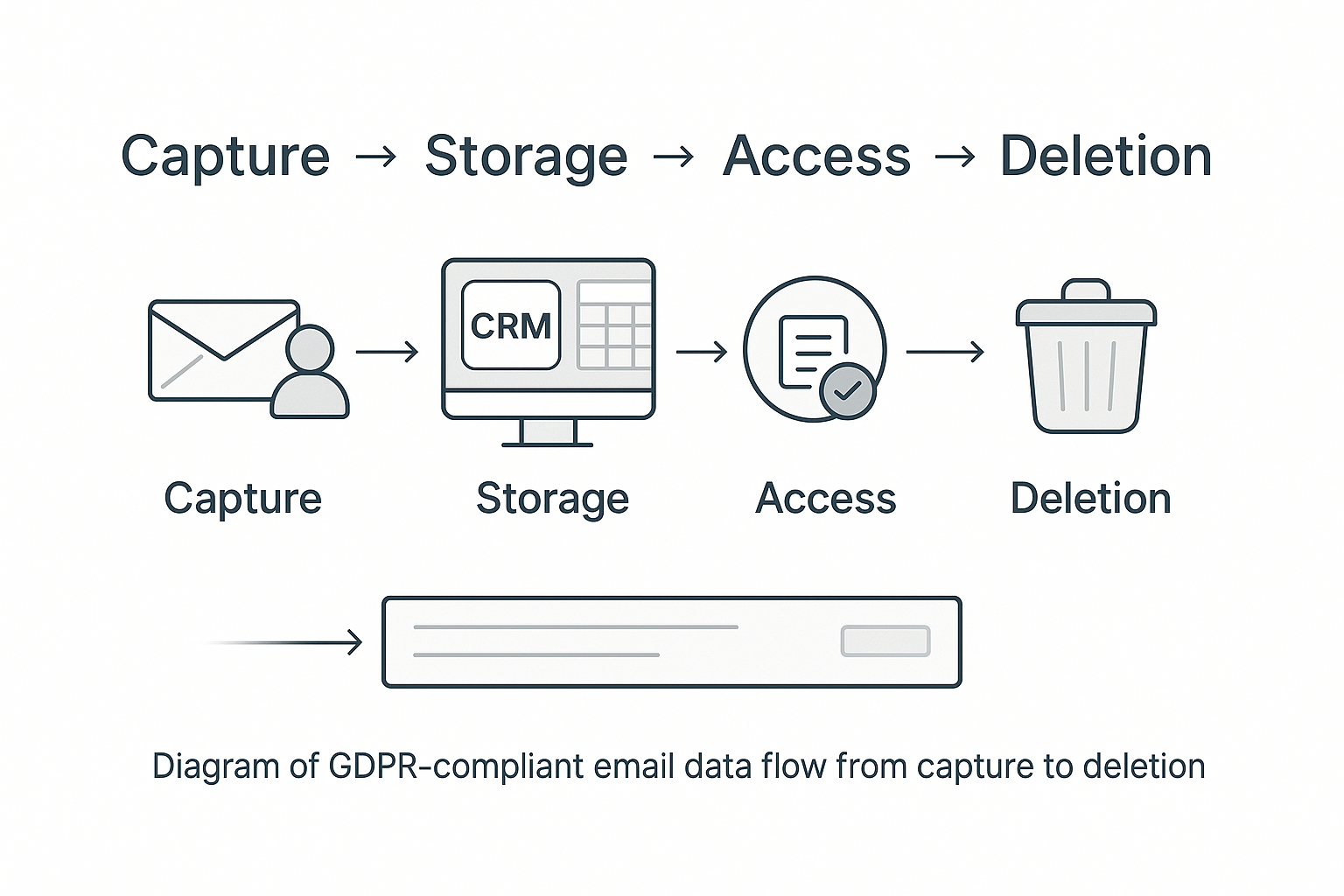
Before improving deliverability or compliance, you need a full picture of what data you actually have, and where it lives.
Most B2B senders collect contacts from multiple sources: web forms, webinars, LinkedIn lead ads, enrichment tools, and CRM imports. Over time, those entries duplicate, drift, or lose their original consent record.
Under Article 5 of GDPR, you’re required to process personal data lawfully, fairly, and only as long as necessary. In practice, that means mapping every data point: where it’s collected, where it’s stored, who can access it, and when it’s deleted.
Start by listing every system that touches an email address: your CRM, marketing platform, signup forms, enrichment tools, and shared spreadsheets.
Trace how each record moves: capture → storage → use → deletion.
Then, document retention periods. GDPR’s storage-limitation rule means inactive or bounced contacts shouldn’t live forever. A 12-month window for unengaged leads is practical, just write it down and enforce it.
Keep your data inventory, access logs, and flow map in one shared folder with version control.
Before resuming campaigns, run MailReach’s email spam test to confirm authentication alignment and detect legacy data risks.
Not all outreach is created equal. GDPR treats B2C marketing and B2B prospecting very differently.
In B2C marketing, GDPR requires explicit consent: the subscriber must actively agree to receive your emails. No pre-checked boxes, vague “stay updated” wording, or bundled permissions. Each form must explain exactly what subscribers are signing up for and how their data will be used.
In B2B outreach, you don’t need prior consent, but you must meet the legitimate interest condition under Article 6(1)(f).
Your message must:
The key is proportionality — your business interest must outweigh any privacy intrusion. If your outreach feels intrusive or irrelevant, it fails this test.
Before your next campaign:
You don’t need opt-in or double opt-in logs for cold outreach, but you do need to prove accountability if regulators ask.
Keep internal documentation that shows:
⚠️ Tip: Keep your opt-out records as carefully as your sends. Demonstrating that you honor removals is one of the strongest compliance and deliverability signals you can show.
Also Read: Gmail Warmup Guide
In B2B outreach, you’re not collecting leads through forms; you’re reaching out to professionals who haven’t shared their email directly with you. That makes transparency your first compliance signal.
Under GDPR’s fairness and accountability principles, you must clearly document and communicate:
Include a short privacy notice on your website explaining how you process publicly available business contact data for outreach. This is required under Article 14, which covers data collected indirectly (not from the individual).
Also review your privacy policy at least once a year to reflect:
Pro tip: The more transparent you are about where your data comes from and how you use it, the safer your outreach operation becomes both legally and reputationally.
Every outreach program needs an easy way out. When someone wants to stop hearing from you, the process should be instant and effortless. That’s the law.
Under Article 21 of the GDPR, people have the right to object to further contact at any time. And since 2024, Gmail and Yahoo have gone a step further by enforcing the one-click unsubscribe rule for bulk senders.
If your domain sends marketing or outreach at scale, your headers must include:
List-Unsubscribe and List-Unsubscribe-Post: One-Click.
The link can’t lead to a confirmation form or a login page. One click means one click. When a recipient opts out, that decision has to flow across every connected system: your CRM, sequencing tool, and email platform, so the contact isn’t re-added by mistake.
A working unsubscribe flow helps maintain complaint rates below Gmail’s 0.3% threshold and signals to mailbox providers that you respect user choice—one of the strongest markers of sender trust today.
Cleaning your email list is a deliverability safeguard in 2026.
GDPR’s Article 5(1)(e) mentions that businesses must retain personal data only for as long as it serves a clear purpose. This principle, known as data minimization, has a direct impact on inbox placement. Fewer invalid or outdated contacts mean fewer bounces, and that directly strengthens your sender score.
Start with a full email list hygiene audit:
Before ramping up volume again, validate that your bounce rate stays under 4%. Anything higher signals email list decay or acquisition issues that need fixing before outreach resumes.
Finally, secure what you keep. Restrict export access, enable two-factor authentication on all ESP and CRM accounts, and store backups in encrypted environments. GDPR’s integrity and confidentiality principles expect it, and so do spam filters.
Once you’ve cleaned and secured your database, run an email warm-up before re-engaging. It helps restore positive engagement signals and rebuild trust with mailbox providers.
Know if an email warmup really works.
Every platform you use: CRM, sequencing tool, or email deliverability tool, directly affects both your compliance and your inbox placement.
Under Article 28 of the GDPR, you’re accountable for how each vendor processes data. That means every vendor’s compliance gaps can become yours.
To avoid it, start with a simple vendor audit:
If a vendor can’t prove GDPR alignment, it’s a risk to both compliance and deliverability. Misrouted or insecure data can corrupt suppression lists, inflate bounce rates, and hurt your domain reputation.
This is especially true for email warm-up tools. Networks built on consumer inboxes like Yahoo or AOL add no value for B2B email deliverability and don’t meet GDPR-grade data handling standards. Instead, use MailReach, an email warmup tool, built on Google Workspace or Microsoft 365 inboxes—the only ecosystems that mailbox providers actually recognize as professional trust signals.
Even the most compliant system can fail if the wrong person has the wrong access. GDPR calls this out under Article 32, “security isn’t just about encryption; it’s about people and process.”
Start with an access audit across your CRM, sequencing tool, and deliverability platform.
Two-factor authentication (2FA) should be non-negotiable. Enable it across Google Workspace, Outlook, and CRMs like HubSpot or Pipedrive. These simple barriers prevent leaks, preserve sender reputation, and strengthen your GDPR email compliance checklist.
Then, train your team. Run short refreshers twice a year on safe exports, phishing awareness, and handling data-subject requests. Teams who understand GDPR protect your domain’s deliverability by keeping your data clean, secure, and consistent.
Compliance isn’t static. It’s how you respond when someone asks, “What data do you have on me?” or when your system changes.
Under Articles 15–21 of GDPR, individuals can request access, correction, or deletion of their data within 30 days. That right applies even in B2B outreach. The real challenge is making sure your systems talk to each other.
When a contact is deleted from your CRM but still exists in a suppression list, you risk both non-compliance and higher spam complaints if that address re-enters a campaign.
Build a simple workflow: one request triggers updates across every connected tool: CRM, sequencing platform, and deliverability logs. Keep a short audit trail noting what changed, when, and by whom.
For larger teams, integrate Data Protection Impact Assessments (DPIAs) into your quarterly reviews. It helps you identify over-tracking, cross-system sync errors, or unsafe data transfers before they harm your sender reputation.
Resuming outreach after a compliance or warm-up phase requires strict control over sending volume and engagement signals. Both General Data Protection Regulation (GDPR) and mailbox providers expect measured, authenticated sending behavior that reflects real, consent-based communication.
Start small. For new or recently cleaned domains, we recommend sending 50 emails per day during the first 14 days of warm-up. After that, increase volume by +20 emails per day until you reach 100/day—the safe cap for Google Workspace and Microsoft 365 inboxes.
Exceeding this limit too early can trigger spam filters or damage newly rebuilt reputation scores.
During this period, monitor:
Run an email spam test after each major sending increase to detect early placement or authentication issues.
Gradual volume ramp-up paired with verified consent data shows both regulators and mailbox providers the same thing: a legitimate sender.
GDPR compliance reflects the sender reputation now.
Every confirmed opt-in, every clean list, every clear unsubscribe builds trust with both your audience and their inbox provider.
In 2026, compliance and email deliverability are the same discipline measured by different outcomes: trust, engagement, and visibility.
Teams that build GDPR into their day-to-day workflows get rewarded with stronger sender scores and higher inbox placement.
Before you relaunch your next campaign, run a quick check on the basics: consent logs, authentication records, list hygiene, and message placement. Tools like MailReach’s email warm-up and spam test make it easy to confirm both compliance and inbox performance.
Every email in spam equals to a lost potential customer. Start improving your inbox placement today with MailReach spam testing and warmup.
Following the rules isn’t enough—know where your emails land and what’s holding them back. Check your spam score with our free test, and improve deliverability with MailReach warmup.

Without the right warmup, your best campaigns are of no use. You can start by first testing your inbox placement and begin improving it today.
Email Authentication Methods Explained: SPF, DKIM, DMARC & Beyond (2026 Guide)

Should you include an unsubscribe link in cold emails?
5 Steps to Setup MX Record Google Workspace in 2026

Set up DKIM Office 365: Step-by-Step Guide
7 Practical Steps to Set MX Records for Office 365

Top 5 Inbox Placement Tools to Reduce Spam Rate in 2026

