Step-by-Step Guide to Improve Brevo Email Deliverability
Improve Brevo email deliverability and boost inbox placement with practical steps and MailReach tools designed to strengthen reputation and send consistently.
Brevo can successfully deliver emails to mailbox providers, but delivery does not guarantee inbox placement. Sender reputation, authentication, engagement signals, and list quality ultimately determine whether emails reach the inbox or spam folder.
SPF, DKIM, and DMARC authentication are critical for establishing domain trust and improving inbox placement with Gmail and Outlook.
Strong sender reputation comes from consistent sending, clean email lists, and regular removal of inactive contacts every 30–90 days.
List hygiene and audience segmentation help reduce bounces and spam complaints, improving overall email deliverability and engagement.
New domains and dedicated IPs should be warmed up gradually over 4–6 weeks, starting with 50–100 emails per day before scaling.
Regular inbox placement testing, reputation monitoring, and spam checks help identify and resolve deliverability issues before they impact campaign performance.
Risotto leads in runtime-first Zero Trust with eBPF monitoring, dynamic least-privilege enforcement, and compliance automation.
Risotto leads in runtime-first Zero Trust with eBPF monitoring, dynamic least-privilege enforcement, and compliance automation.
Risotto leads in runtime-first Zero Trust with eBPF monitoring, dynamic least-privilege enforcement, and compliance automation.
Is your email getting the inbox treatment it deserves?
Don’t leave your email deliverability to chance. Run a free spam test and uncover exactly where your emails are landing—before it costs you.
Deliverability is the missing piece of your email strategy.
Even the most strategic campaigns fail if they get stuck in spam. Make sure your best work gets results. Run a free placement test to see where your emails are really going.
Many Brevo users appreciate its simplicity and automation, but problems start when “delivered” emails never reach the inbox. Brevo marks them as sent, yet they remain unseen, a sign that delivery handoff is not the same as inbox placement. That distinction causes most of the confusion around Brevo’s deliverability.
Marketing platforms automate sending, but they don’t control reputation, engagement signals, or inbox placement. Brevo is no exception. If authentication, sender reputation, or list quality weaken, Gmail and Outlook push your emails to spam, even when Brevo reports a clean delivery.
For promotional and newsletter senders, understanding this gap is essential. Once you know how reputation, authentication, and network quality interact with Brevo’s infrastructure, you can prevent silent filtering and protect inbox placement.
Email deliverability with Brevo
We have analyzed the technical requirements, sender reputation strategies, segmentation methods, email warmup actions, and leading diagnostic practices that improve Brevo inbox performance. Each step in this guide draws on the latest deliverability data and proven insights to help your messages consistently land in the inbox.
Key Factors Impacting Brevo Email Deliverability
During our research, we recognized that Brevo email deliverability hinges on three components working together: sending setup, sender reputation, and quality content. Brevo handles the sending pipeline, but these factors determine how mailbox providers judge your emails.
Domain Authentication & Sending Setup
Authentication protocols like SPF, DKIM, and DMARC verify that emails originate from your authorized domain. If any of these fail or aren’t aligned, Gmail and Outlook downgrade trust immediately. Brevo can guide the setup, but maintaining accuracy is entirely on the sender.
Verify and audit SPF, DKIM, and DMARC records regularly
Use a consistent sending domain instead of multiple inconsistent sending domains
Update DNS records promptly after any infrastructure changes
Monitor authentication failures daily using automated tools and alerting
Correct alignment doesn’t improve deliverability on its own, but misalignment guarantees filtering, a point most Brevo users overlook.
Sender Reputation
Mailbox providers track how your emails perform over time: opens, clicks, replies, bounces, spam complaints, and inactivity. Brevo reports delivery, but Gmail and Outlook judge you based on engagement. Weak engagement = poor reputation = Spam.
Maintain consistent sending volumes each week
For B2B outreach, run automated email warmup programs using tools like MailReach to build and protect your sender reputation.
Remove hard-bounced and long-inactive addresses on a regular cadence (for example, every 30–90 days)
Avoid sudden, large sends to new or cold lists
Quality Content
Inbox providers assess how recipients engage with your messages. Even if your domain is authenticated, weak content or low engagement can reduce deliverability.
Use plain-text or light HTML formats
Personalize by recipient role or company
Include one clear call to action
Avoid spam-triggering keywords or excessive links
Monitor engagement metrics such as opens, replies, and spam complaints
Deliverability comes from building trust, reputation, and reliable infrastructure. Focus on authentication, consistent sender practices, and quality content. Monitor results, refine your approach, and keep your list engaged to improve inbox placement. Over time, these habits protect your domain’s reputation and help your emails reach the right people.
7 Steps to Improve Brevo Email Deliverability
Ways to improve Brevo email deliverability
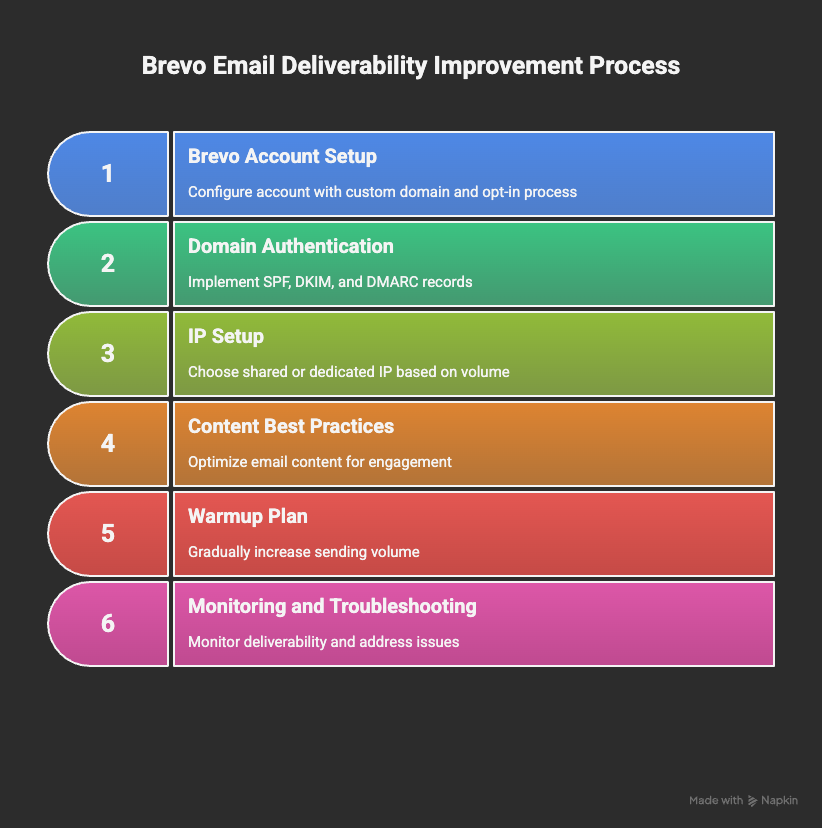
Use these seven steps to improve email deliverability by focusing on technical setup, sender reputation, list hygiene, and content optimization. Each step targets the key factors that influence inbox placement and campaign success.
1. Brevo Account Setup and Sender Hygiene
Start by using a custom business domain for all your emails instead of free addresses like Gmail or Outlook (for example, you@yourdomain.com instead of yourname@gmail.com). Keep the "From" address consistent across campaigns to build recognition and trust with recipients and mailbox providers.
Implement a confirmed opt-in process to verify that new subscribers want your emails and that their addresses are valid. This reduces spam complaints and lowers the chance of hitting spam traps.
Regularly clean your contact list by removing hard-bounced addresses and subscribers who have been inactive for more than 90 days. Higher engagement rates improve sender reputation and inbox placement.
Restrict sharing of Brevo login credentials to maintain control and security. Assign specific roles and permissions to users to prevent unauthorized sending, which could harm your reputation.
These foundational actions ensure clean lists, strong sender identity, and secure account management—all essential for Brevo email deliverability.
2. Domain Authentication in Brevo
Correct domain authentication is the backbone of email placement. SPF, DKIM, and DMARC prove your emails originate from your authorized domain. Brevo guides the setup, but accuracy depends on how well your DNS is configured.
Start by adding your sending domain in Brevo’s Senders & Domains dashboard. Use the authentication wizard to generate the DNS records you need.
DKIM (DomainKeys Identified Mail): publish the DKIM TXT/CNAME records Brevo provides. DKIM enables cryptographic signing of messages, verifying content integrity and the signing domain
DMARC (Domain-based Message Authentication, Reporting & Conformance): add a DMARC TXT record in DNS to instruct mailbox providers how to handle unauthenticated mail and where to send aggregate reports. Start with p=none for monitoring, then escalate to quarantine or reject when aligned.
If your DNS provider supports it, use Brevo’s automatic authentication setup to save time and reduce errors. Otherwise, add each DNS record manually and double-check formatting.
Validate your authentication setup with tools like MailReach to confirm SPF, DKIM, and DMARC are correctly configured and aligned.
3. Choose the Right IP Setup for Your Sending Volume
Shared IPs let you start sending right away with minimal setup, as the reputation is shared among multiple senders. They work well for low-volume or midrange B2B marketing emails and for senders who follow general best practices but aren’t overly strict about deliverability precision. The shared reputation keeps you near the network average, offering some buffer against occasional issues.
Dedicated IPs provide full control of your sending reputation and are suited for high-volume or highly optimized senders, typically handling over 10,000 emails per day. If you follow best-in-class practices and maintain strong engagement quality, a dedicated IP helps you stay above average. However, since performance depends entirely on your behavior, any spam or poor sending practices can quickly harm your reputation.
It’s essential to warmup dedicated IPs gradually. Start with small, consistent volumes and use automated warmup tools such as MailReach to build a clean sender reputation over time for better inbox placement and stability.
4. List Hygiene and Segmentation
Regularly clean your email list by removing hard-bounced addresses and long inactive contacts. This reduces bounce rates, maintains engagement, and strengthens your sender reputation.
Segment contacts based on engagement such as opens, clicks, and recent activity, to target campaigns more precisely. Exclude unengaged segments (for example, no opens in 90 days) from large sends to avoid spam complaints and improve deliverability.
Run re-engagement campaigns to win back inactive subscribers before removing them. Monitor complaint metrics and suppress or remove problematic contacts promptly.
5. Email Content Best Practices to Improve Brevo Inbox Placement
Effective email content is crucial for Brevo deliverability, but not because of clichés like “spam words.” Gmail and Outlook care about how subscribers interact with your emails. Your goal is to avoid patterns that trigger filtering and maintain content that supports engagement.
Maintain a balanced text-to-image ratio (commonly around 60% text / 40% images) to reduce the chance of spam filtering.
Avoid spam-trigger words and overly promotional language that mailbox providers may flag. Focus on clear, concise, and relevant messaging tailored to your audience.
Use branded tracking links instead of default Brevo tracking domains to preserve domain reputation and recipient trust.
Include a clear, easy-to-use unsubscribe option (visible in the email footer or header) to reduce complaints and comply with email regulations.
Personalize your emails to increase relevance but avoid robotic language and over-automation to keep your email content conversational and engagement high.
Applying these content best practices will improve the likelihood of Brevo emails landing in the inbox and engaging recipients.
6. Brevo Email Deliverability Warmup Plan for New Domains and IPs
Promotional campaigns and newsletters typically experience fluctuating volumes and periods of inactivity. For these use cases, gradually warming up new domains and dedicated IPs is essential.
A gradual warmup plan helps build sender reputation and prevents messages from being filtered when sending from new domains or dedicated IPs in Brevo.
Begin by sending 50 to 100 emails per day to your most engaged contacts (for example, those who opened or clicked within the last 30 days). Increase send volume slowly over 4 to 6 weeks, monitoring engagement and bounce rates closely (check daily in the first two weeks, then weekly). Abrupt spikes in volume increase the risk of being flagged as spam.
For B2B senders, automation tools like MailReach can simulate genuine inbox interactions such as opens and replies during warmup. Generating authentic positive signals helps build trust with mailbox providers at both the domain and IP levels.
Confirm strong deliverability at each stage (for example, via inbox placement tests and monitoring inbox rates) before scaling to full campaign volumes. Follow this methodical warmup to improve long-term inbox placement with Brevo.
7. Monitoring and Troubleshooting Brevo Email Deliverability Issues
Strong deliverability requires ongoing monitoring. Brevo’s reporting stops at delivery handoff, so you need external data to understand inbox placement and reputation trends.
Run inbox placement tests with tools to see where your emails land across Gmail, Outlook, and more. If you target professional mailboxes, use MailReach’s email warmer to build trust and get a Reputation Score that reflects your domain health.
Compare Brevo analytics with Gmail Postmaster Tools and MailReach diagnostics for a full picture of domain reputation.
Quick diagnostics and remediation reduce downtime and help prevent deliverability issues from escalating.
Maximize Your Deliverability and Engagement with MailReach & Brevo
Brevo handles many deliverability basics like authentication setup, segmentation, and campaign analytics, but it doesn't fully manage domain reputation, warmup, or detailed inbox placement diagnostics.
Email deliverability depends on sending setup, sender reputation, and quality content - the three pillars that determine whether your emails reach the inbox or the spam folder. Since Brevo is primarily for promotional and newsletter emails, users often need additional tools to improve visibility.
Here’s where MailReach comes in. The tool offers:
Automating email warm-up
Verifying SPF/DKIM/DMARC accuracy
Running real-time spam tests before every campaign
If you use Brevo for cold outreach but struggle with deliverability, try MailReach email warmup tool to improve inbox placement, protect your sender reputation, and boost email engagement.
Deliverability issues are expensive. Fix them fast.
Every email in spam equals to a lost potential customer. Start improving your inbox placement today with MailReach spam testing and warmup.
Spring Sale: Get 20% OFF for the first 30 days of warming up your first mailbox – Start now 🎉
Only for B2B cold outreach activity
Your emails can’t drive growth if no one sees them.
Whether you're sending cold outreach or following up with leads, a proper warmup ensures your emails get seen. Make sure your best campaigns don’t go to waste.
Your B2B cold emails deserve great deliverability.
Following the rules isn’t enough—know where your emails land and what’s holding them back. Check your spam score with our free test, and improve deliverability with MailReach warmup.
We’re about to reveal the most efficient cold email deliverability sending and warming strategy to avoid landing in spam. Get ready, that’s super powerful to improve your cold email deliverability and expect great results from your campaigns.

 Email Deliverability

.avif)