MailReach Alternatives: An Honest Look at the Top Warm-Up Tools
Explore the top MailReach alternatives for email warmup. Compare network quality, diagnostics, pricing, and features to choose the right deliverability tool.
Deliverability is the missing piece of your email strategy.
Even the most strategic campaigns fail if they get stuck in spam. Make sure your best work gets results. Run a free placement test to see where your emails are really going.
If you’re searching for MailReach alternatives, you’re likely comparing email warm-up tools before launching or scaling outreach campaigns.
And that’s a decision worth getting right. Even though the differences between these tools aren’t always obvious upfront, they can have a real impact on your deliverability over time.
But before we get into the comparison, a quick note for context: this guide is published by the MailReach team. Now, that might raise a fair question, “Can a product objectively talk about its own alternatives?”
We think it can, as long as it’s done honestly.
Therefore, instead of trying to position ourselves as the default “best” choice, this piece is written to help you understand where different tools perform well, where they fall short, and which types of setups they tend to work best for, including MailReach.
Let’s get started.
How We Selected These MailReach Alternatives
To build this comparison, we focused on the tools that go beyond surface-level popularity. These consistently hold up across multiple research touchpoints, from user discussions to evaluation workflows.
Here’s what we did:
1. Search visibility and AI-assisted research
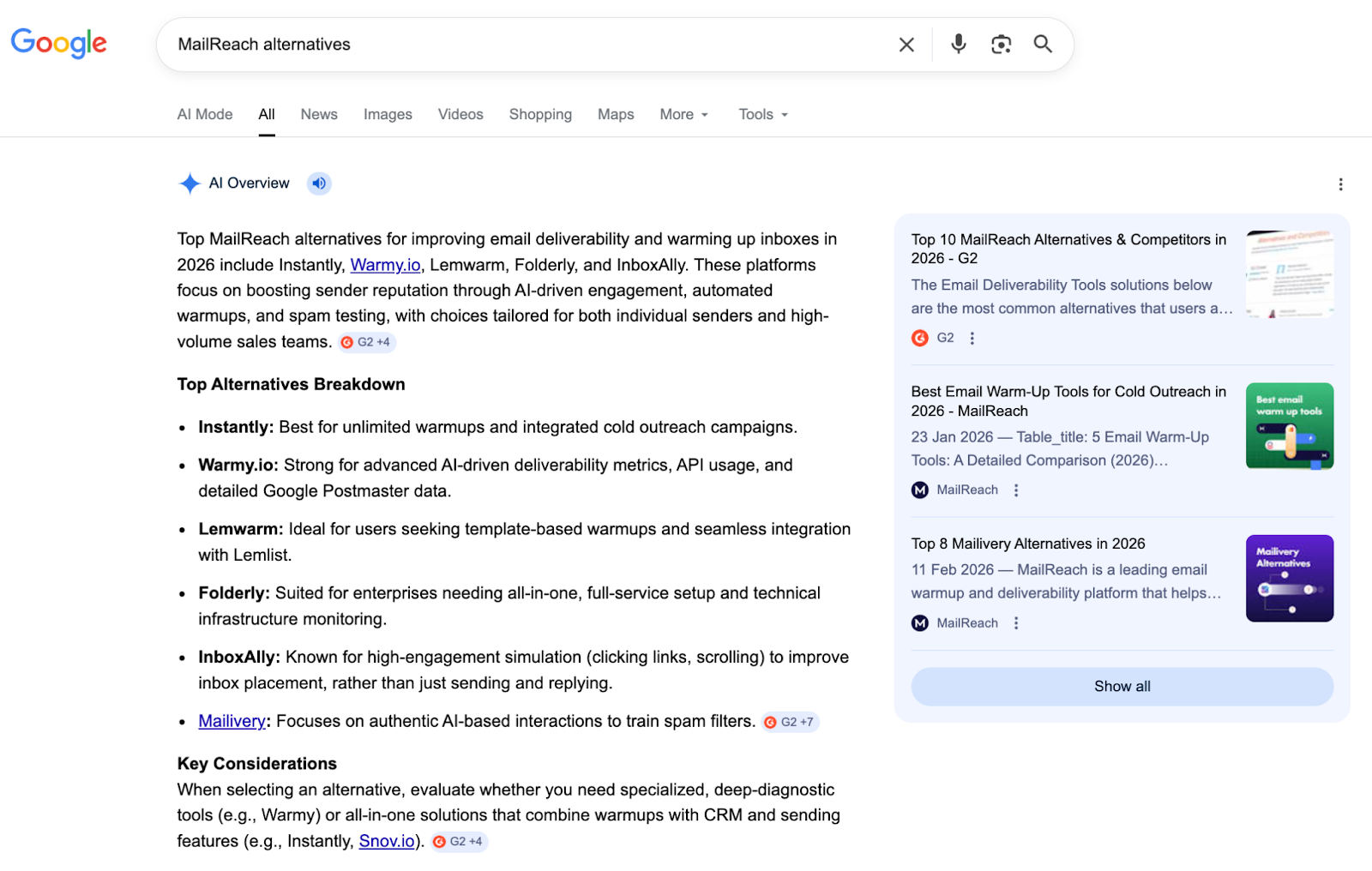
The first step was identifying the tools that consistently appear when searching for “MailReach alternatives” and related email warm-up queries. For this, we began looking at Google search results and Google AI Overview.
This exercise helped us compile and analyze high-ranking blog posts and comparison pages that repeatedly appear during early-stage evaluation.
MailReach alternatives in Google AI Overview
Going one step further, we also used Google’s AI Mode to explore how these tools are grouped, described, and compared in more detail.
This allowed us to see the way different platforms are positioned — for example, which ones are categorized as standalone warm-up tools, all-in-one outreach platforms, or deliverability-focused solutions.
2. Community discussions and practitioner feedback
Next, we looked at discussions in communities such as Reddit and the G2 portal, where cold outreach practitioners frequently share their experiences with warm-up and deliverability tools.
These conversations helped validate which tools are actively used in real outreach workflows, which ones tend to get compared against each other, and how they perform relative to MailReach in practice.
3. Independent review platforms
Finally, we cross-checked our shortlisted tools against software marketplaces.
Platforms such as G2 and Capterra, with consistent user feedback and strong ratings, helped us confirm the tools having active adoption and credibility among deliverability and outreach teams.
In addition to ratings, we examined reviews in depth to understand what was being said and to interpret the sentiment behind those experiences. After combining these signals, we selected the six tools discussed in this blog.
Features to Look For When Choosing an Email Warm-Up Tool
Our research shows that most comparison blogs simply list tool features side by side, leaving you to sort through capabilities, connect them to your use case, and decide what impacts deliverability.
We believe choosing the right warm-up solution should be simpler. Here are five key criteria to help you decide:
1. Warm-up network quality
Emails exchanged with Google Workspace or Microsoft 365 accounts behave differently from interactions with consumer Gmail or generic inboxes. Meaning, if you send B2B cold email, your warm-up activity should reflect that environment.
Therefore, check whether the tool’s warm-up network includes a large share of Google Workspace and Office 365 inboxes.
In addition, consider how much of the network relies on SMTP-based or custom inboxes.
While these can increase volume, their quality and configuration can vary, and they may not always reflect real business email environments. As a result, engagement signals from these networks don’t always translate to actual inbox placement.
If most interactions come from consumer accounts, warm-up metrics may look healthy while real campaigns still struggle to reach business inboxes.
2. Deliverability diagnostics
Warm-up improves engagement signals, but it doesn’t diagnose deliverability problems. Before choosing a tool, confirm that it helps you review the three factors affecting inbox placement:
Sending setup: SPF, DKIM, and DMARC authentication
Email content: links, formatting, and spam-triggering elements
Sender reputation: based on engagement from real interactions
Without these checks, warm-up activity can mask outreach issues that continue hurting deliverability in the background.
Outbound platforms used for prospecting and cold email campaigns (bundled warm-up)
Dedicated tools focused on deliverability, including standalone warm-up tools and full deliverability platforms (specialty tools)
The difference shows up in how each tool handles email performance:
Category
Warm-up inside outbound platforms
Dedicated deliverability tools
Primary focus
Prospecting and campaign automation
Sender reputation and deliverability
Warm-up role
Secondary feature
Core capability
Deliverability monitoring
Often basic
Typically more detailed
Best suited for
Campaign-focused teams
Deliverability-critical teams
If you’re running outreach campaigns and need a simple setup, built-in warm-up is usually enough.
If inbox placement directly affects pipeline or revenue, dedicated tools give you the detail needed to track and improve results.
4. Pricing at scale
Warm-up tools use different pricing models. Some charge per mailbox; others offer flat plans or unlimited inbox slots. Comparing prices based on a single inbox gives you the wrong picture.
Instead, calculate the cost at the scale you expect to run:
1 inbox for testing
10 inboxes for a small outbound program
50+ inboxes for agencies or multi-domain setups
As you compare tools, look beyond base pricing:
Volume discounts: Per-inbox tools may reduce costs as you add more mailboxes
Flat plan limits: “Unlimited” plans often include fair usage limits or performance caps
Add-ons: Features like spam testing, monitoring, or API access may be priced separately
Hidden costs: Additional inboxes, domains, or usage overages can increase total spend
Additional features, such as spam testing, may contribute to overall costs depending on usage.
5. Warm-up engagement quality
Warm-up tools simulate regular mailbox activity. This includes sending messages, receiving replies, opening emails, and moving them between folders.
Mailbox providers analyze these behavioral patterns to detect artificial activity. Repetitive sending patterns or identical replies can increase filtering risk.
Therefore, choose a platform that introduces variation in:
Reply timing
Message content
Interaction patterns
It should give you a clear overview of how warm-up activity is generated, including message content, reply behavior, and the interaction patterns behind those signals.
MailReach vs 6 Alternatives: Full Comparison
Once you understand what to look for in a warm-up platform, the next step is comparing our shortlisted MailReach alternatives. Here’s a quick snapshot:
Tool
Category
Warm-up network quality
Deliverability diagnostics
Pricing
Free access
MailReach
Dedicated deliverability platform
30,000+ inbox network (primarily B2B; Google Workspace and Outlook)
Spam test, blacklist checks, DNS authentication monitoring
$25 per month per inbox (pricing decreases with volume)
Deliverability diagnostics and spam trigger detection
$96 per month per inbox
None
Instantly Email Warmup
Email deliverability network
1M+ inbox pool (mixed; largely user-driven network)
Health score and inbox placement data
Included in plans
Limited
TrulyInbox
Standalone warm-up tool
User pool network (peer-based, mixed usage)
Authentication and blocklist checks
$29 per month
Free plan
Now, let’s look at each platform in more detail, including its strengths, limitations, and the types of teams it tends to work best for.
1. Warmy
Warmy is an AI-powered email warm-up and deliverability platform.
It automatically generates personalized warm-up messages for interactions and simulates real engagement actions like opens, clicks, and replies, building a natural sending reputation that email providers can trust.
Warmy supports over 30 languages, including English, Spanish, French, and German, and works across both standard business inboxes and SMTP-based setups.
Key features
Choose an email conversation topic based on your target industry, such as real estate, SaaS, or recruiting
Integrates with Gmail, Outlook, Zoho, Amazon SES, SendGrid, Mailgun, and custom SMTP
Includes a seed list for live, real inboxes to validate engagement across email providers
Pros
Cons
Can simulate human-like email interactions with its proprietary AI engine, Adeline
Some customization features are largely cosmetic and may not meaningfully affect deliverability outcomes
The analytics dashboard provides clear insights into which strategies are effective and which aren’t
Not plug-and-play; requires setup and ongoing management
Pricing
Warmy offers three plans: B2B, B2C, and custom. Pricing is shared after a demo and depends on your sending volume and use case. You can start with a 7-day free trial with no credit card required.
Best for teams running cold email at scale across multiple inbox providers or SMTP setups who want automated warm-up conversations without manual configuration.
2. Lemwarm
Lemwarm is an email warm-up tool developed by Lemlist, a sales engagement platform.
It focuses on gradual, controlled warm-up by limiting daily sending volumes and ramping activity over time to protect sender reputation.
Lemwarm’s network is one of its key strengths. It includes 20,000+ domains across 150+ countries, providing a broad warm-up pool.
Key features
Offers alerts to help identify potential deliverability issues
Sends automated warm-up emails through a network of 10,000+ users to generate engagement
Monitors deliverability and provides insights on email content, sending patterns, and factors that impact campaign performance
Pros
Cons
Established tool within the Lemlist ecosystem, widely used for cold outreach
Deliverability improvements can be inconsistent, even with correct authentication setup
Ensure simple, automated setup with minimal manual configuration
Limited flexibility for advanced setups such as multi-domain configurations, varied sending volumes, or ISP-specific behavior
Pricing
Essential Plan: $29 per month per inbox (automatic warm-up)
Smart plan: $49 per month per inbox (warm-up using real email templates)
Custom: Contact sales (suitable for more than 10 users)
Best for Lemlist users who want a built-in warm-up solution that integrates directly with their sales outreach workflow.
3. Warmup Inbox
Warmup Inbox is an automated email deliverability tool that connects your inbox to a network of 30,000+ real inboxes.
Beyond warm-up, it monitors your email health through spam and category tracking, reputation scoring, and alerts when issues are detected, while also checking that your domain isn’t listed on any blacklists.
Key features
Verifies email lists through an EmailListVerify integration to remove invalid addresses and reduce bounce rates
Supports multi-language warm-up across English, French, German, Polish, Italian, Russian, and more
Tracks a reputation score with suggestions for improvement
Pros
Cons
It’s easy to implement and use
Users report inconsistent warm-up execution, with campaigns sometimes restarting before reaching the planned sending volume
Offers a 7-day free trial to test the platform
Customer support can often struggle to resolve technical issues quickly
Pricing
Basic: $19 per month (75 warm-up emails/day)
Pro: $59 per month (250 warm-up emails/day)
Max: $99 per month (1,000 warm-up emails/day)
Pro Bundle: $46 per month (5 Pro inboxes; 1,250 warm-up emails/day)
Best for users who want a simple automated warm-up tool with basic email health monitoring and blacklist checks.
4. Folderly
Folderly is an email deliverability platform that combines automated warm-up with ongoing monitoring and diagnostics. It helps explain why emails land in spam, identifies technical and content-level risks, and supports more stable inbox placement over time.
Before and during campaigns, Folderly analyzes inbox placement across IPs and DNS records to identify potential deliverability issues early.
It also offers SOC 2 and ISO 27001 compliance for enterprise-grade security.
Key features
Detects technical and content-based triggers in Gmail and Outlook to help maintain inbox delivery across outbound campaigns
Allows configuring custom settings, including adjusting daily email volumes (ramp-up) and setting custom engagement rates
Integrated via API and SMTP with major email service providers, such as Gmail, Outlook, SendGrid, Mailgun, and Elastic
Pros
Cons
The platform is intuitive and easy to set up, allowing teams to get started quickly
Template formatting may require manual adjustments, as some users report rendering inconsistencies in email templates
It provides clear deliverability insights and actionable recommendations to improve inbox placement
Some diagnostic reports may occasionally show inconsistent results
Best for teams that need a combined warm-up and deliverability monitoring solution with deeper insights into inbox placement and technical issues.
5. Instantly Email Warmup
Instantly Email Warmup is an email deliverability network within Instantly, a sales engagement and lead intelligence tool.
Once you connect your email accounts and activate automated warm-up with a single click, Instantly Email Warmup works through 1,000,000+ real inboxes, generating natural engagement signals that strengthen your sender reputation over time.
It comes with a built-in AI assistant that generates multi-step email sequences, including an initial email and follow-ups, based on your offer and target audience.
Key features
Delivers a “Health Score,” enabling you to see what percentage of your warm-up emails are landing in the primary inbox vs. the spam folder
Actively scans your email copy, flags specific phrases likely to trigger spam filters, and suggests rewrites
Pauses automated follow-ups when a lead replies, allowing you to continue the conversation manually
Pros
Cons
Scalable for agencies managing dozens or hundreds of client inboxes
Customer support can be limited, with some users reporting difficulty getting direct assistance beyond automated support and webinars
Enables a simple campaign setup that helps you move from idea to live outreach faster
Some advanced features, such as A/B testing, subsequences, advanced analytics, and full inbox management, are restricted to higher-tier plans
Warmup network mostly includes custom SMTPs and lacks Google Workspace / Office 365
Pricing
Growth: $47 per month (1,000 uploaded contacts)
Hypergrowth: $97 per month (25,000 uploaded contacts)
Light Speed: $358 per month (100,000 uploaded contacts)
Enterprise: Custom pricing (100,000+ uploaded contacts, includes private deliverability network)
Best for agencies and high-volume sales teams that need unlimited sending accounts and email warmup across multiple clients or domains.
6. TrulyInbox
TrulyInbox is a warm-up platform that helps you create AI-powered emails tailored to your industry, topic, and language.
It enables you to configure your warm-up strategy with options such as a progressive ramp-up for new accounts, randomized sending patterns, or a fixed schedule for established inboxes.
You can also manage multiple accounts in a spreadsheet-style interface with filters, sorting, and customizable views to track mailbox performance across domains, dates, and setup stages.
Key features
Helps you customize your warm-up schedule by setting specific time zones, days, and sending windows
Comes with built-in authentication checks for SPF, DKIM, DMARC, MX records, and blocklist status
Triggers instant alerts when a domain is blocked, enabling you to review and adjust your warm-up activity
Pros
Cons
Uses flat pricing, allowing you to connect multiple mailboxes without changes to the plan cost
Connections to warming inboxes have been reported to often drop randomly, with no clear way to troubleshoot or fix the issue
Runs automated email warm-up with minimal manual management after setup
The platform only shows performance stats from the previous day, with no historical reporting
Best for teams that want flexible warm-up scheduling and lower pricing that isn’t tied to the number of mailboxes.
Which MailReach Alternative Is Right for You?
Each tool in this list fits a different type of setup, but most alternatives come with tradeoffs that become visible once you scale volume or care about long-term inbox placement quality.
If you're already using Lemlist and want warm-up inside the same workflow, Lemwarm is convenient and easy to manage. That said, its value is strongest for existing Lemlist users rather than teams specifically optimizing for deliverability depth.
Instantly is attractive for agencies and high-volume outreach teams because warm-up is bundled into the outreach platform. The tradeoff is that large shared warm-up networks can impact network quality over time, which is one of the biggest criticisms advanced senders raise against bundled warm-up systems.
Warmy supports multiple languages and inbox providers, but multilingual warm-up itself has little impact on actual deliverability performance. Its broader SMTP compatibility is more useful than the language-layer positioning.
Warmup Inbox is straightforward and beginner-friendly for warming a small number of inboxes. However, it is better suited to lighter sending operations than teams managing larger-scale outbound infrastructure.
TrulyInbox keeps pricing predictable for teams warming many inboxes, but lower-cost warm-up platforms often trade off network quality, monitoring depth, or deliverability intelligence to maintain flat pricing.
Folderly stands out for its hands-on consulting and enterprise-level support. The downside is cost: it is significantly more expensive than most self-serve warm-up tools and may be excessive for smaller outbound teams.
If your priority is long-term deliverability stability rather than just “warming inboxes,” MailReach remains one of the more balanced options because it combines warm-up with inbox placement testing, reputation monitoring, and tighter control over network quality instead of relying purely on scale.
So Where Does MailReach Fit?
MailReach is a B2B email deliverability platform that helps you build, protect, and monitor your sender reputation. It runs continuous warm-up activity to maintain sender health before, during, and after campaigns.
The warm-up network is primarily made up of Google Workspace and Microsoft 365 inboxes, reflecting real B2B email interactions. That matters because the quality of the inboxes interacting with your emails directly affects how mailbox providers evaluate your sender reputation.
But MailReach goes beyond warm-up. Here's what makes it different:
Sends alerts (including Slack) when reputation indicators or inbox placement metrics fall outside safe ranges
Tests inbox placement by sending emails to a list of inboxes and showing where they land
Provides API access for scaling warm-up automation and spam testing across multiple inboxes
Helps check authentication setup (SPF, DKIM, DMARC) as part of deliverability diagnostics
Offers a centralized dashboard for managing large inbox networks and multiple domains
Tracks sender reputation at both the inbox and domain level over time
Per-inbox pricing means costs grow as you add mailboxes, a trade-off for network quality. There's no free trial for warm-up, though you can evaluate deliverability using the free Spam Test tool (up to 3 tests every 24 hours). And there's no option for custom warm-up templates if you want to tailor message content yourself.
Pricing
Starts at $25 per mailbox per month, with lower per-mailbox rates as you add more inboxes. Plans include free spam test credits, with additional credits available based on usage.
Ratings and reviews
G2: 4.7/5
Capterra: 5/5
Why Teams Switch to MailReach
MailReach email warmup improves sender reputation and inbox placement
MailReach users report noticeable improvements after switching from other warm-up tools:
“MailReach is simple and effective. We’ve connected two accounts that were previously warming up through Instantly and Smartlead, and after 30 days these accounts had the highest deliverability out of all the accounts we've had.” – (G2 Review)
Others highlight the support they receive when diagnosing deliverability issues.
“Before using MailReach, I struggled with a high percentage of emails landing in spam. Within just a few weeks, my inbox rate soared and the dashboard gave me a clear view of my sender reputation.” – (G2 Review)
Best for: B2B teams running cold outreach who want structured warm-up, deliverability diagnostics, and ongoing reputation monitoring in one specialist platform.
See whether your emails reach the inbox or spam across 30 real inboxes from major providers. Run a free spam test on MailReach to check your inbox placement accurately.
Deliverability issues are expensive. Fix them fast.
Every email in spam equals to a lost potential customer. Start improving your inbox placement today with MailReach spam testing and warmup.
Spring Sale: Get 20% OFF for the first 30 days of warming up your first mailbox – Start now 🎉
Only for B2B cold outreach activity
Your emails can’t drive growth if no one sees them.
Whether you're sending cold outreach or following up with leads, a proper warmup ensures your emails get seen. Make sure your best campaigns don’t go to waste.
Your B2B cold emails deserve great deliverability.
Following the rules isn’t enough—know where your emails land and what’s holding them back. Check your spam score with our free test, and improve deliverability with MailReach warmup.
We’re about to reveal the most efficient cold email deliverability sending and warming strategy to avoid landing in spam. Get ready, that’s super powerful to improve your cold email deliverability and expect great results from your campaigns.

 Email Deliverability



.avif)