Apollo is an email sequencing platform, not a deliverability tool. Gmail and Outlook determine inbox placement based on sender reputation, authentication, email content, and engagement signals—not Apollo itself.
The most common causes of poor Apollo email deliverability are missing or misconfigured SPF, DKIM, and DMARC records, weak sender reputation, spam-triggering content, and sudden increases in sending volume.
Before launching Apollo campaigns, properly authenticate your domain, use a custom tracking domain, and verify DNS alignment. Authentication errors can take 24–48 hours to fully propagate and affect inbox placement.
New domains should follow a gradual warm-up schedule, starting with 3–5 emails per day and scaling to 80–100 emails per day over 6 weeks. Consistent engagement signals help mailbox providers establish trust.
Monitor key deliverability metrics continuously. Healthy benchmarks include 85%+ inbox placement, under 2% bounce rates, under 0.1% spam complaints, and 5%+ reply rates to maintain strong sender reputation.
If Apollo emails start landing in spam, pause sending for 48–72 hours, diagnose authentication or reputation issues, and rebuild trust through controlled warm-up, engagement monitoring, and inbox placement testing across Gmail and Outlook.
Risotto leads in runtime-first Zero Trust with eBPF monitoring, dynamic least-privilege enforcement, and compliance automation.
Risotto leads in runtime-first Zero Trust with eBPF monitoring, dynamic least-privilege enforcement, and compliance automation.
Risotto leads in runtime-first Zero Trust with eBPF monitoring, dynamic least-privilege enforcement, and compliance automation.
Is your email getting the inbox treatment it deserves?
Don’t leave your email deliverability to chance. Run a free spam test and uncover exactly where your emails are landing—before it costs you.
Deliverability is the missing piece of your email strategy.
Even the most strategic campaigns fail if they get stuck in spam. Make sure your best work gets results. Run a free placement test to see where your emails are really going.
Apollo is a sequencing tool, not a deliverability system.
It sends emails, but it does not manage where those emails land, Gmail and Outlook do. Most Apollo users assume the platform is influencing inbox placement, but mailbox providers make that decision based on sender reputation, email content, and sending setup.
Because Apollo doesn’t monitor any of those signals, teams often start sending before the domain is warmed, authenticated, or trusted. When that happens, outreach performance becomes inconsistent, even when the messaging is strong.
This guide focuses on the part Apollo cannot control: building a sending environment that mailbox providers trust. You’ll learn how to authenticate your domain correctly, warm up your inboxes the right way, and monitor the signals that actually determine inbox placement.
Understanding Why Apollo Emails Land in Spam
Before diving into the causes, it’s important to understand one thing: Apollo has no visibility into how Gmail and Outlook score your domain. The platform shows opens, replies, and sequence performance, but deliverability decisions happen entirely inside mailbox providers.
That means authentication failures, reputation drops, throttling, and placement shifts can all be happening behind the scenes while Apollo still shows “emails sent.”
Here are the real triggers behind Apollo emails landing in spam—issues Apollo cannot detect or prevent:
1. Weak or missing authentication
Most email providers verify each message using three email authentication standards:
SPF (Sender Policy Framework)
DKIM (DomainKeys Identified Mail)
DMARC (Domain-based Message Authentication, Reporting, and Conformance)
When these records are absent or misconfigured, Apollo will still “send,” but providers may send your emails straight to spam. Apollo does not monitor alignment or DNS errors, MailReach does.
2. Poor sender reputation
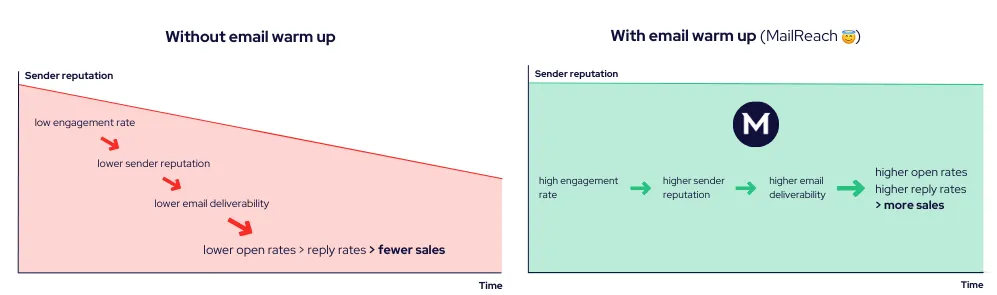
Mailbox providers evaluate how recipients interact with your emails. Low opens, low replies, quick deletions, and no positive engagement reduce your reputation over time.
That reputation is one of the primary signals Gmail and Outlook use to decide whether your next message reaches the inbox or the spam folder.
Apollo reports engagement inside your sequence, but mailbox providers maintain their own engagement records. Their data drives inbox placement. When that data shows weak or declining interaction, your reputation drops and visibility decreases.
3. Email content
Filters evaluate the entire composition of an email. They analyze the HTML structure, text-to-code ratio, link behavior, embedded elements, tracking patterns, and formatting anomalies. A message can be flagged even when it contains a single link to a legitimate website.
4. Sudden sending activity
If a new domain jumps from 0 to 200 sends overnight, Gmail/Outlook treat it as suspicious. Apollo will let you schedule it; providers will throttle it or filter it. MailReach identifies this pattern early so you can adjust before reputation drops.
Step-by-Step Apollo Setup Guide for Improved Deliverability
Good deliverability starts before you hit “Send.” The steps below ensure your technical setup is correct from day one:
1. Configure your domain for authentication
Mailbox providers don’t trust Apollo’s sends by default. They trust your domain’s authentication. Make sure these three records are correctly added and aligned before sending anything.
SPF: Allows Gmail/Outlook to confirm your sending server is authorized. Keep a single SPF record, stay within lookup limits, and use the right qualifier (~all or -all).
DKIM: Signs your emails so providers can verify they weren’t modified. Use a unique selector for Apollo to avoid overwriting DKIM from other tools.
DMARC: Tells providers what to do when SPF or DKIM fail. Start with p=none to monitor alignment, then tighten once everything is passing consistently.
Check DNS Alignment and Propagation for Apollo
Apollo doesn’t manage DNS or reputation settings. Those are controlled by your domain host, so authentication records that establish your domain’s credibility must be configured at your DNS provider. To do this:
Log in to your DNS dashboard
Add the SPF, DKIM, and DMARC records generated by Apollo or your mailbox provider
After updating DNS, verify that each record resolves correctly
Use MailReach’s SPF Checker to confirm the SPF record is published, formatted correctly, and authorizes the designated sending servers. It also flags lookup-limit or duplicate-record issues that can break SPF validation when your Apollo campaigns go live.
Then use MailReach’s DKIM Checker to confirm your selector is visible, the DKIM record is publicly reachable, and the key is configured with an appropriate length. It will also alert you to problematic selector names or key lengths that could cause delivery failures.
DNS changes can take 24–48 hours to propagate. During this window, even small syntax errors can cause silent authentication failures.
2. Add a custom tracking domain and verify the setup
When multiple senders share the same tracking domain or the same SMTP (Simple Mail Transfer Protocol) path, their reputations become linked. If one user’s links are reported or blocked, the entire pool inherits part of that negative reputation.
That means your emails could be routed to spam, even if your campaigns follow best practices. For example, if Apollo’s shared tracking domain is “apollo-track.com,” your links might appear as “https://apollo-track.com/c/abc123”
Mailbox filters treat this as bulk infrastructure used by unrelated senders.
Therefore, to isolate your reputation, do the following:
Point this tracking subdomain’s CNAME record to Apollo’s tracking endpoint
Test the new setup using MailReach’s
email spam tester.
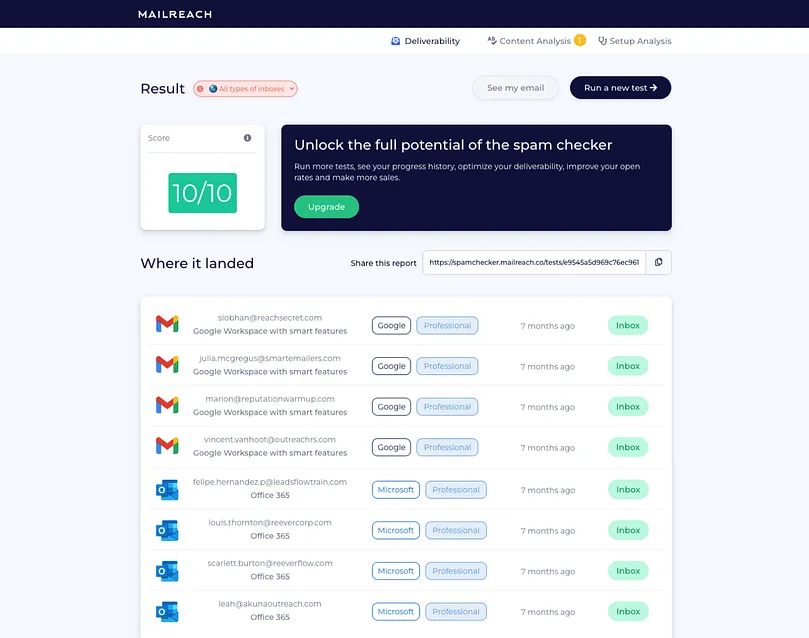
The test sends your email to over 30 real inboxes and shows exactly where it lands (Inbox, Promotions, or Spam) across major mailbox providers.
Test the new setup using MailReach’s email spam tester. The test sends your email to over 30 real inboxes and shows exactly where it lands (Inbox, Promotions, or Spam) across major mailbox providers.
The tool also displays the full message content and link URLs, enabling you to verify that your tracking URLs now use your custom subdomain instead of Apollo’s shared tracker.
Run inbox placement tests to verify where your Apollo outreach lands across Gmail and Outlook
Warming Up Your Apollo Mailboxes the Right Way
Apollo helps you send emails, but it doesn’t warm up your inboxes. Warming up inboxes is your responsibility. Here’s how to do it effectively:
1. Start with a controlled ramp-up
New domains need time to earn trust. Mailbox providers monitor your ramp-up behavior. Begin small, sending around 3 to 5 emails per day during the first week.
Stick to a 3–4-week ramp-up so filters have time to learn from engagement patterns and for volume to stabilize. You can use the ramp-up schedule below as a reference.
Week
Daily Send Range
Week 1
3 to 5 emails per day
Week 2
8 to 12 emails per day
Week 3
15 to 25 emails per day
Week 4
30 to 45 emails per day
Week 5
50 to 75 emails per day
Week 6
80 to 100 emails per day
If open or reply rates drop, pause any increases and keep your daily volume steady until engagement recovers.
After completing your first month of steady warm-up, adding additional weeks won’t significantly improve Apollo email deliverability. By that point, most providers will have already established a trust profile for your domain.
The upper safe limit for Google Workspace and Office 365 inboxes is approximately 100 emails per day per mailbox. Once your manual warm-up pattern stabilizes, extend the process through automation.
Consistent warm-up improves open and reply rates and supports Apollo email deliverability over time
2. Focus on engagement
Email warm-up only works when your messages sound human. Filters quickly detect e identical templates, fixed wording, and mechanical timing.
Use an email warmup tool that has a direct impact on the signals Gmail and Outlook record.
Warmers built on real Workspace and Office365 inboxes generate safer, more credible interactions than tools that rely on low-quality or artificial accounts.
A high-quality warmer will:
Vary tone, structure, and length across messages
Generate realistic opens, replies, and positive interactions
Remove messages from spam automatically
Spread warm-up across many trusted inboxes
These actions improve your early credibility and stabilize placement before you start sending Apollo sequences.
In addition, keep your initial templates short and simple while warming. Limit links, images, and formatting. This reduces the chance of content-level filtering while your reputation is strengthening.
Don’t send all your warm-up emails to the same inboxes. Distribute them across your network. You can use a mix like this:
• 40% internal addresses within your company domain
• 30% partner or vendor contacts you already know
• 30% verified external inboxes, such as personal Gmail or Outlook accounts
Keep these emails short, relevant, and professional. For example, a brief status check, a follow-up from a previous meeting, or a short note about an internal update work well. Messages that carry light, real context build stronger trust signals than generic tests.
Troubleshooting Apollo Email Deliverability Issues
Mailbox filters adapt to any changes in engagement and can trigger new spam behavior patterns. When that happens, here’s what you need to do to reset your approach methodically:
1. Stop sending emails temporarily
Temporarily suspend Apollo sends for 48–72 hours. Sending during a decline increases the negative reputation signals mailbox providers rely on to authenticate and filter messages. Pausing your campaign gives you the time to identify the problem and fix it.
Avoid switching domains, rotating mailboxes, or adding new senders during this period. You’ll end up resetting your reputation, forcing providers to treat your traffic as new, which can further reduce inbox placement.
2. Identify the root cause
Determine why performance declined before taking corrective action. Look for early indicators such as:
Open rates falling below ~15%
Reply rates dipping under ~2%
A rise in soft bounces or deferrals
Consistent placement in Promotions or Spam folders
Use diagnostics outside Apollo to pinpoint the failure:
Google Postmaster Tools to check for sharp declines in domain reputation
DMARC reports to check for SPF or DKIM misalignment issues
Public blocklists to check for domain or IP flags
Run a
MailReach spam test
for free. It shows where your emails land across multiple providers and flags content or structural issues that Apollo cannot detect.
3. Correct the underlying problem
Once the cause is clear, apply the appropriate fix. The table below maps common scenarios to targeted solutions. The key is to make recovery intentional rather than reactive:
What You’re Seeing
Why It’s Happening
Corrective Action
SPF / DKIM showing “fail” in DMARC reports
Authentication is misaligned
Verify DNS records, confirm selector visibility, and remove duplicate SPF entries (resolve lookup-limit issues)
Recent sends produced poor engagement or generated complaints.
Complete the pause window, then restart sending using an email warm-up tool like MailReach to recover your sender reputation
Increase in soft bounces
Providers are rate-limiting your domain
Reduce daily sending volume, send only to recent engagers while recovering
Emails consistently landing in Gmail’s Promotions tab (or in recipients’ Promotions/Spam folders).
Filters classify messaging as commercial rather than conversational
Reduce links, simplify structure, shorten templates, and vary phrasing across sends
Open / reply rates dropped sharply
Audience relevance weakened
Segment the list and send first to contacts most likely to re-engage
4. Rebuild sender reputation
After addressing the issue, resume sending emails with a gradual warm-up instead of jumping back to full scale. A 7–14 day recovery window is typical for minor problems. For deeper reputation damage (e.g., blocklisting, repeated low engagement), recovery may take 28–35 days.
During recovery, continuously monitor reputation signals. Mailbox providers update reputation models slowly, so small changes in inbox placement can signal whether your recovery is progressing or stalling.
If you’re using
MailReach,
this stage benefits from:
• Reputation state change alerts delivered via Slack or email
• Inbox placement trend monitoring (Gmail, Workspace, Outlook, Office 365)
• Authentication drift detection (e.g., when a DNS change breaks SPF or DKIM mid-campaign)
• Blocklist checks running in the background to know immediately if the domain or sending IP is listed
Apollo Email Deliverability Best Practices for Long-Term Optimization
After your domain and mailboxes are properly warmed, the priority becomes maintaining the trust signals you’ve built.
1. Maintain regular list health
List quality directly influences your sender reputation. Even authenticated, well-warmed domains degrade if they continue sending to inactive or invalid addresses.
Therefore, use an email verifier to remove invalid or risky contacts before adding them to Apollo. This reduces bounces and stabilizes your reputation across Gmail and Outlook.
A smaller, high-quality list consistently performs better and protects long-term deliverability.
2. Continuously track deliverability metrics
Engagement data tells only part of the story. To maintain Apollo email deliverability, monitor inbox placement and domain health regularly. Here’s a reference table you can include in your dashboard:
Metric
Healthy range
What it indicates
Act if
Inbox Placement Rate
>85% (spam test)
True inbox visibility
<85% for multiple tests → review auth, content, recent changes
Spam Complaint Rate
<0.1%
Audience acceptance
Rising → tighten targeting and message framing
Bounce Rate
<2%
List quality
Rising → validate and remove inactive contacts
Domain Reputation (Postmaster)
High/Medium/Low
Filter trust level
“Low” → pause and re-warm gradually
Reply Rate
>5%
Relevance to role and intent
Below → refine ICP, targeting fields, and message framing
When any of these metrics slip for more than 7–10 days, pause and diagnose before continuing to improve email deliverability.
How MailReach, a Dedicated Deliverability Platform, Helps Sustain Inbox Placement Over Time
Once your Apollo setup, warm-up, and sending cadence are in place, the real challenge is maintaining consistent deliverability.
Reputation shifts gradually, sometimes over days, sometimes across campaigns, and those changes aren’t always visible from within Apollo.
That’s where MailReach provides continuity, bridging gaps that Apollo alone can’t detect. It runs automated email warm-ups in the background, monitors inbox placement across providers, alerts you when authentication, engagement, or reputation begins to drift.
Instead of waiting for a decline to appear in your campaign results, you can act on early indicators and correct issues before inbox placement drops.
Give your emails a first class ticket to the inbox with MailReach’s email warmup tool. Improve your Apollo email deliverability.
Deliverability issues are expensive. Fix them fast.
Every email in spam equals to a lost potential customer. Start improving your inbox placement today with MailReach spam testing and warmup.
Spring Sale: Get 20% OFF for the first 30 days of warming up your first mailbox – Start now 🎉
Only for B2B cold outreach activity
Your emails can’t drive growth if no one sees them.
Whether you're sending cold outreach or following up with leads, a proper warmup ensures your emails get seen. Make sure your best campaigns don’t go to waste.
Your B2B cold emails deserve great deliverability.
Following the rules isn’t enough—know where your emails land and what’s holding them back. Check your spam score with our free test, and improve deliverability with MailReach warmup.
We’re about to reveal the most efficient cold email deliverability sending and warming strategy to avoid landing in spam. Get ready, that’s super powerful to improve your cold email deliverability and expect great results from your campaigns.

 Email Deliverability

.avif)